



MS Excel 2003: Convert an entire spreadsheet to uppercase
This Excel tutorial explains how to write a macro to convert an entire spreadsheet to uppercase in Excel 2003 and older versions (with screenshots and step-by-step instructions).
Question: In Microsoft Excel 2003/XP/2000/97, how do I convert an entire spreadsheet into uppercase?
Answer: This can be done with a macro.
Let's look at an example.
Download Excel spreadsheet (as demonstrated below)
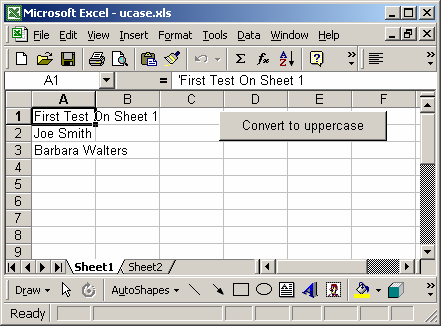
In our spreadsheet, we have two sheets called Sheet1 and Sheet2.
We've placed a button on Sheet1 that when clicked will move through each sheet in the spreadsheet updating each value to uppercase. This macro will then leave you positioned on the last sheet in the spreadsheet.
This is what your spreadsheet will look like after you've run the macro:
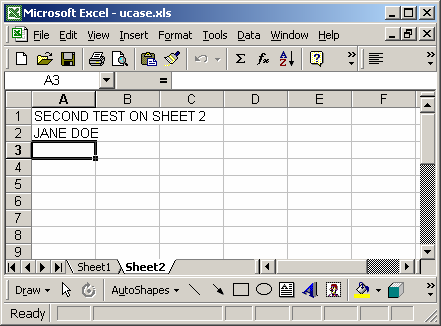
You'll now be positioned on Sheet2 and all of the values should now appear in uppercase.
To view the macro, press Alt+F11 and double-click on the module called Module1 in the left window.
Macro Code
This macro code looks like this:
Sub ConvertToUppercase()

   Dim ws As Object
   Dim LCell As Range

   'Turn off screen updating to increase performance
   Application.ScreenUpdating = False
   Application.Calculation = xlCalculationManual

   'Move through each sheet in your spreadsheet
   For Each ws In ActiveWorkbook.Sheets

      On Error Resume Next
      ws.Activate

      'Convert all constants and text values to proper case
      For Each LCell In Cells.SpecialCells(xlConstants, xlTextValues)
         LCell.Formula = UCase(LCell.Formula)
      Next
   Next ws

   'Turn screen updating back on
   Application.Calculation = xlCalculationAutomatic
   Application.ScreenUpdating = True

End Sub
Advertisements