



MS Excel 2003: Change the background color of a row based on a cell value
This Excel tutorial explains how to write a macro to change the background color of a row based on a cell value in Excel 2003 and older versions (with screenshots and step-by-step instructions).
Question: In Microsoft Excel 2003/XP/2000/97, is it possible to create a macro to change the background color of a row, when the first 6 characters of a cell (within that row) is a certain value?
For example, I'd like to change the background of a row to blue, if the UPC Code in column C starts with '007007'.
Answer: Yes, this is possible. To change the background color of a row based on a cell value, we will need to create a macro and then create a button to call the macro.
Download Excel spreadsheet (as demonstrated below)
In the spreadsheet below, we've created a button that calls a macro to update the background color of each row. The macro is called "Update_Row_Colors".
It will start at row 7 and test each value in column C. The macro will stop testing values when it encounters row 2000.
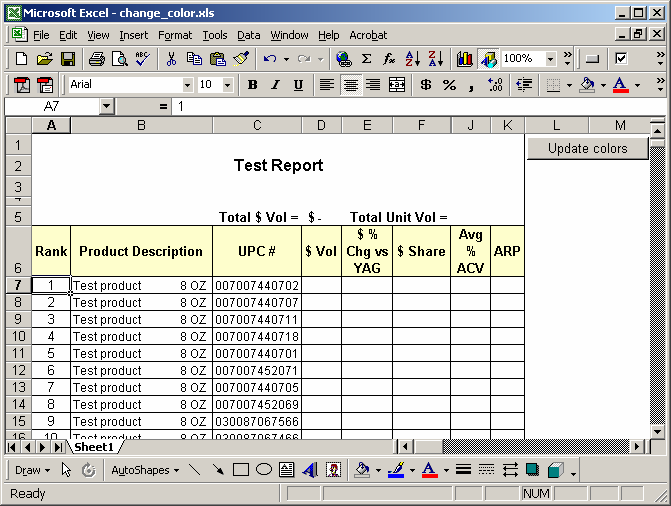
After we click on the button called "Update colors", the spreadsheet now looks like this:
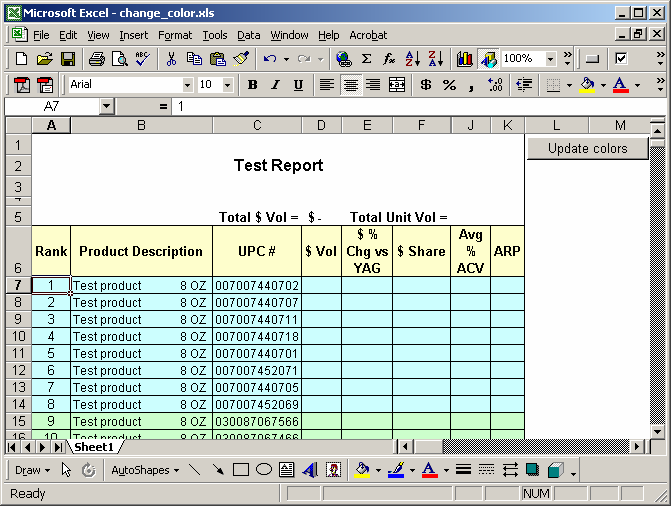
As you can see, the UPC in rows 7 to 14 started with '007007' so the macro updated the background color to blue. If the UPC started with '030087', the background color was updated to light green...and so on.
This macro can easily be modified to accommodate more UPC codes, by adding additional values in the case statement.
You can view the macro by pressing Alt+F11.
Macro Code
The macro code looks like this:
Sub Update_Row_Colors()

   Dim LRow As Integer
   Dim LCell As String
   Dim LColorCells As String

   'Start at row 7
   LRow = 7

   'Update row colors for the first 2000 rows
   While LRow < 2000
      LCell = "C" & LRow
      'Color will changed in columns A to K
      LColorCells = "A" & LRow & ":" & "K" & LRow

      Select Case Left(Range(LCell).Value, 6)

         'Set row color to light blue
         Case "007007"
            Range(LColorCells).Interior.ColorIndex = 34
            Range(LColorCells).Interior.Pattern = xlSolid

         'Set row color to light green
         Case "030087"
            Rows(LRow & ":" & LRow).Select
            Range(LColorCells).Interior.ColorIndex = 35
            Range(LColorCells).Interior.Pattern = xlSolid

         'Set row color to light yellow
         Case "063599"
            Rows(LRow & ":" & LRow).Select
            Range(LColorCells).Interior.ColorIndex = 19
            Range(LColorCells).Interior.Pattern = xlSolid

         'Default all other rows to no color
         Case Else
            Rows(LRow & ":" & LRow).Select
            Range(LColorCells).Interior.ColorIndex = xlNone

      End Select

      LRow = LRow + 1
   Wend

   Range("A1").Select

End Sub
Advertisements