



MS Excel: Cells
In Microsoft Excel, a cell is a rectangular box that occurs at the intersection of a vertical column and a horizontal row in a worksheet. Vertical columns are numbered with alphabetic values such as A, B, C. Horizontal rows are numbered with numeric values such as 1, 2, 3.
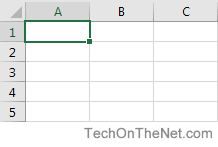
Each cell has its own set of coordinates or position in the worksheet such as A1, A2, or M16. In the example above, we are positioned on cell A1 which is the intersection of column A and row 1.
A cell can only store 1 piece of data at a time. You can store data in a cell such as a formula, text value, numeric value, or date value.
There are many things that you can do with cells in Excel such as changing the font format, number format, background, alignment, and conditional formatting. Here is a list of topics that explain how to use cells in Excel.
Font Format
- Change the font in a cell in Excel 2016 | 2013 | 2011 | 2010 | 2007 | 2003
- Change the font color in a cell in Excel 2016 | 2013 | 2011 | 2010 | 2007 | 2003
- Change the font size in a cell in Excel 2016 | 2013 | 2011 | 2010 | 2007 | 2003
- Draw a line through a value in a cell (strikethrough) in Excel 2016 | 2013 | 2011 | 2010 | 2007 | 2003
- Create a subscript value in a cell in Excel 2016 | 2013 | 2011 | 2010 | 2007 | 2003
- Create a superscript value in a cell in Excel 2016 | 2013 | 2011 | 2010 | 2007 | 2003
- Use the Format Painter Excel 2016 | 2013 | 2011 | 2010 | 2007 | 2003
Number Format
- Format display of text in a cell (ie: numbers, dates, etc) in Excel 2016 | 2013 | 2011 | 2010 | 2007 | 2003
Fill/Background Format
Alignment Format
- Align text to the top of the cell in Excel 2016 | 2013 | 2011 | 2010 | 2007 | 2003
- Center text across multiple cells in Excel 2016 | 2013 | 2011 | 2010 | 2007 | 2003
- Wrap text in a cell in Excel 2016 | 2013 | 2011 | 2010 | 2007 | 2003
- Merge cells in Excel 2016 | 2013 | 2011 | 2010 | 2007 | 2003
- Wrap text in merged cells in Excel 2016 | 2013 | 2011 | 2010 | 2007 | 2003
- Rotate text in a cell in Excel 2016 | 2013 | 2011 | 2010 | 2007 | 2003
- Stop "wrap text" when pasting in Excel 2013 | 2011 | 2010 | 2007 | 2003
Border/Line Format
Protection
- Protect a cell in Excel 2016 | 2013 | 2011 | 2010 | 2007 | 2003
- Hide formulas from appearing in the edit bar in Excel 2016 | 2013 | 2011 | 2010 | 2007 | 2003
Conditional Formatting
- Change the font color based on the value in the cell in Excel 2011 | 2010 | 2007 | 2003
- Automatically alternate row colors (one shaded, one white) in Excel 2010 | 2007 | 2003
- Automatically alternate row colors (two shaded, two white) in Excel 2010 | 2007 | 2003
- Automatically alternate row colors (three shaded, three white) in Excel 2010 | 2007 | 2003
- Automatically highlight highest and lowest values in a range of cells in Excel 2011 | 2010 | 2007 | 2003
- Automatically highlight expired dates and dates that are 30 days from expiration in Excel 2010 | 2007 | 2003
- Highlight 1st, 2nd, 3rd highest scores in Excel 2003
- Change the font color in one cell based on the value in another cell in Excel 2003
Data Validation
- Set up a cell to allow a maximum number of characters in Excel 2016 | 2013 | 2011 | 2010 | 2007 | 2003
- Set up a cell to allow a specific number of characters in Excel 2016 | 2013 | 2011 | 2010 | 2007 | 2003
- Set up a cell to allow positive numbers in Excel 2016 | 2013 | 2011 | 2010 | 2007 | 2003
Comments
AutoCorrect
- Turn off AutoCorrect in Excel 2010 | 2007 | 2003
Miscellaneous
- Copy and paste only nonblank cells (condensing paste range) in Excel 2013 | 2011 | 2010 | 2007 | 2003
Advertisements