



MS Excel 2003: Copy data to various sheets based on the value in column A
This Excel tutorial explains how to write a macro to copy data to various sheets based on the value in a column in Excel 2003 and older versions (with screenshots and step-by-step instructions).
Question: In Microsoft Excel 2003/XP/2000/97, how do you write a macro that does the following:
- If column A (on sheet BOM) contains "A", then change the row to bold and left justify that row, and add a blank row above it.
- If column A (on sheet BOM) contains "P", then copy certain cells from that row to sheet "PICK LIST".
- If column A (on sheet BOM) contains "S", then copy certain cells from that row to sheet "SHEAR PARTS".
- If column A (on sheet BOM) contains "T", then copy certain cells from that row to sheet "TRUMPF".
I'd also like to put borders around all cells that contain data in the BOM sheet as well as the "PICK LIST", "SHEAR PARTS", and "TRUMPF" sheets, and fill in the formula in column I on the BOM sheet.
How can I do all of this?
Answer: Let's look at an example.
Download Excel spreadsheet (as demonstrated below)
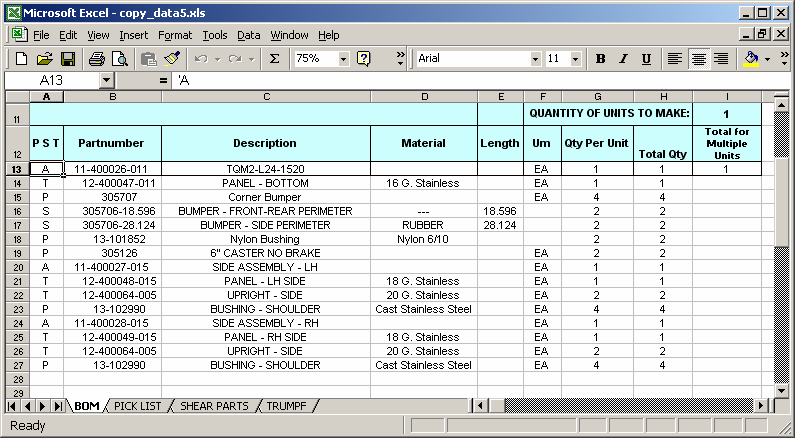
In our spreadsheet, we have a main sheet called BOM that contains the raw data, and there are 3 sheets that we want to copy the data to - "PICK LIST", "SHEAR PARTS", AND "TRUMPF".
When an "A" is found in column A, that row is bolded and left justified and a blank row is added above it (with the exception of the first row not having a blank row above it). When a "P" is found in column A, the row's contents are copied to the "PICK LIST" sheet. When a "S" is found in column A, the row's contents are copied to the "SHEAR PARTS" sheet. When a "T" is found in column A, the row's contents are copied to the "TRUMPF" sheet.
Also, we've calculated the formula down for column I, which for example, is =H14*QTY in cell I14.
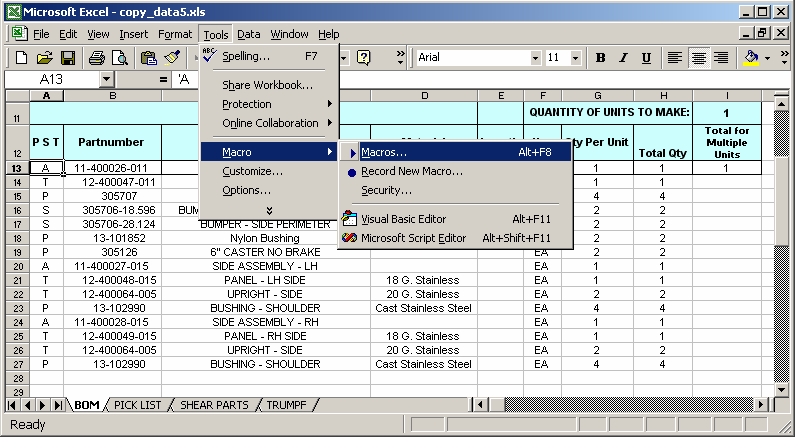
You can run the macro by select Macro > Macros under the Tools menu.
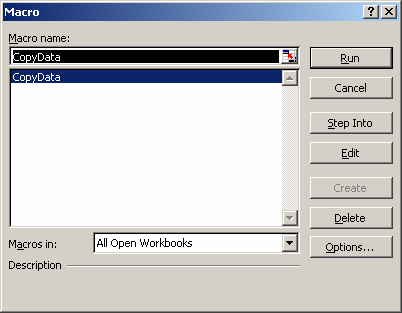
Then select the macro called CopyData and click on the Run button.
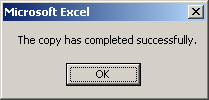
When the macro was completed, the message box above will appear.
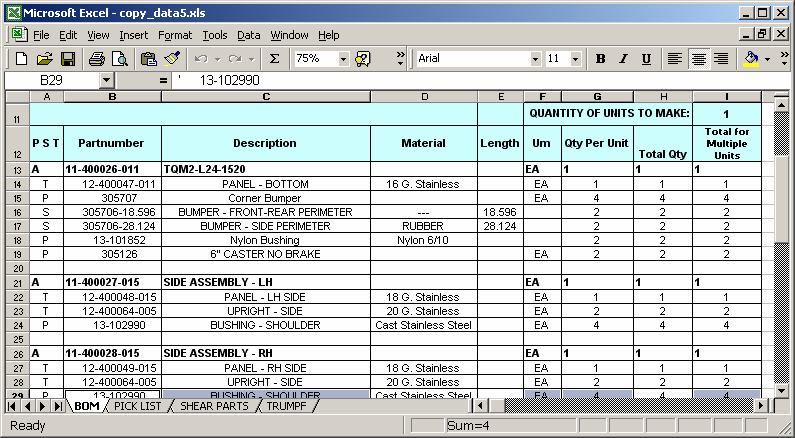
As you can see, on sheet BOM, each row with an "A" value in column A has been bolded and left justified. As well, the formula has been completed in column I.
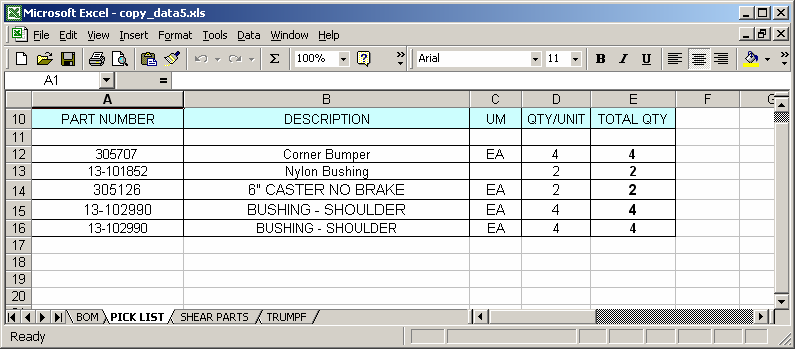
On the sheet "PICK LIST", the data has been copied where the value in column A on the BOM sheet was "P".
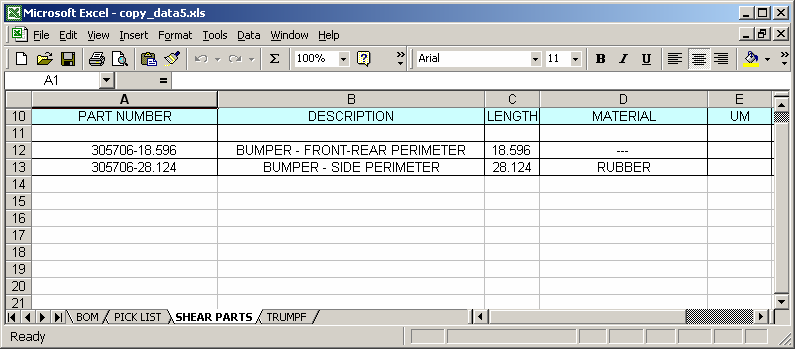
On the sheet "SHEAR PARTS", the data has been copied where the value in column A on the BOM sheet was "S".
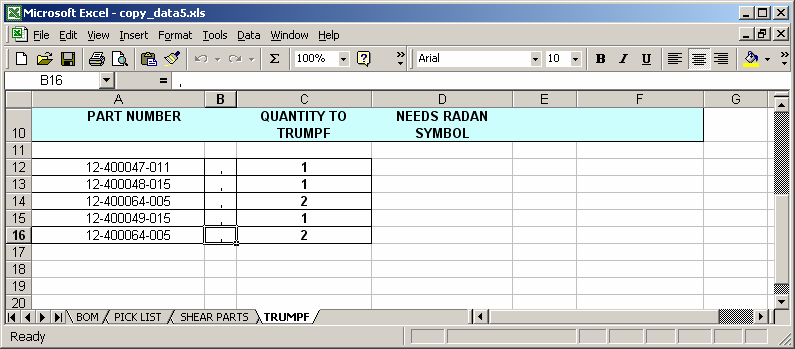
On the sheet "TRUMPF", the data has been copied where the value in column A on the BOM sheet was "T".
You can press Alt+F11 to view the VBA code.
Macro Code
The macro code looks like this:
Sub CopyData()

   Dim LSheetMain As String
   Dim LSheetP As String
   Dim LSheetS As String
   Dim LSheetT As String
   Dim LContinue As Boolean
   Dim LFirstRow As Integer
   Dim LRow As Integer
   Dim LCurPRow As Integer
   Dim LCurSRow As Integer
   Dim LCurTRow As Integer

   'Set up names of sheets
   LSheetMain = "BOM"
   LSheetP = "PICK LIST"
   LSheetS = "SHEAR PARTS"
   LSheetT = "TRUMPF"

   'Initialize variables
   LContinue = True
   LFirstRow = 13
   LRow = LFirstRow
   LCurPRow = 12
   LCurSRow = 12
   LCurTRow = 12

   Sheets(LSheetMain).Select

   'Loop through all column A values until a blank cell is found
   While LContinue = True

      'Found a blank cell, do not continue
      If Len(Range("A" & CStr(LRow)).Value) = 0 Then
         LContinue = False

      'Copy and format data
      Else

         'Place borders around cells
         Range("A" & CStr(LRow) & ":I" & CStr(LRow)).Borders(xlEdgeLeft).LineStyle = xlContinuous
         Range("A" & CStr(LRow) & ":I" & CStr(LRow)).Borders(xlEdgeLeft).Weight = xlThin
         Range("A" & CStr(LRow) & ":I" & CStr(LRow)).Borders(xlEdgeTop).LineStyle = xlContinuous
         Range("A" & CStr(LRow) & ":I" & CStr(LRow)).Borders(xlEdgeTop).Weight = xlThin
         Range("A" & CStr(LRow) & ":I" & CStr(LRow)).Borders(xlEdgeBottom).LineStyle = xlContinuous
         Range("A" & CStr(LRow) & ":I" & CStr(LRow)).Borders(xlEdgeBottom).Weight = xlThin
         Range("A" & CStr(LRow) & ":I" & CStr(LRow)).Borders(xlEdgeRight).LineStyle = xlContinuous
         Range("A" & CStr(LRow) & ":I" & CStr(LRow)).Borders(xlEdgeRight).Weight = xlThin
         Range("A" & CStr(LRow) & ":I" & CStr(LRow)).Borders(xlInsideVertical).LineStyle = xlContinuous
         Range("A" & CStr(LRow) & ":I" & CStr(LRow)).Borders(xlInsideVertical).Weight = xlThin

         'Set up formula for column I
         Range("I" & CStr(LRow)).Formula = "=H" & CStr(LRow) & "*QTY"

         '--- "A" ---
         If Range("A" & CStr(LRow)).Value = "A" Then

            'Bold and left justify
            CStr(LRow)).Font.Bold = True
            Range(CStr(LRow) & ":" & CStr(LRow)).HorizontalAlignment = xlLeft

            'If not first row, insert blank row
            If LRow <> LFirstRow Then
               Rows(CStr(LRow) & ":" & CStr(LRow)).Select
               Selection.Insert Shift:=xlDown
               LRow = LRow + 1
            End If

         '--- "P" ---
         ElseIf Range("A" & CStr(LRow)).Value = "P" Then

            'Copy values from columns B, C, F, G, and I from BMO sheet
            Range("B" & CStr(LRow) & ",C" & CStr(LRow) & ",F" & CStr(LRow) & ",G" & CStr(LRow) & ",I" & CStr(LRow)).Select
            Selection.Copy

            'Paste onto "PICK LIST" sheet
            Sheets(LSheetP).Select
            Range("A" & CStr(LCurPRow)).Select
            Selection.PasteSpecial Paste:=xlValues, Operation:=xlNone, SkipBlanks:=False, Transpose:=False
            Range("A1").Select

           'Place borders around cells
            Range("A" & CStr(LCurPRow) & ":E" & CStr(LCurPRow)).Borders(xlEdgeLeft).LineStyle = xlContinuous
            Range("A" & CStr(LCurPRow) & ":E" & CStr(LCurPRow)).Borders(xlEdgeLeft).Weight = xlThin
            Range("A" & CStr(LCurPRow) & ":E" & CStr(LCurPRow)).Borders(xlEdgeTop).LineStyle = xlContinuous
            Range("A" & CStr(LCurPRow) & ":E" & CStr(LCurPRow)).Borders(xlEdgeTop).Weight = xlThin
            Range("A" & CStr(LCurPRow) & ":E" & CStr(LCurPRow)).Borders(xlEdgeBottom).LineStyle = xlContinuous
            Range("A" & CStr(LCurPRow) & ":E" & CStr(LCurPRow)).Borders(xlEdgeBottom).Weight = xlThin
            Range("A" & CStr(LCurPRow) & ":E" & CStr(LCurPRow)).Borders(xlEdgeRight).LineStyle = xlContinuous
            Range("A" & CStr(LCurPRow) & ":E" & CStr(LCurPRow)).Borders(xlEdgeRight).Weight = xlThin
            Range("A" & CStr(LCurPRow) & ":E" & CStr(LCurPRow)).Borders(xlInsideVertical).LineStyle = xlContinuous
            Range("A" & CStr(LCurPRow) & ":E" & CStr(LCurPRow)).Borders(xlInsideVertical).Weight = xlThin

            'Increment row counter on "PICK LIST" sheet
            LCurPRow = LCurPRow + 1

            'Go back to BOM sheet and continue where left off
            Sheets(LSheetMain).Select

         '--- "S" ---
         ElseIf Range("A" & CStr(LRow)).Value = "S" Then

            'Copy values from columns B, C, and E from BMO sheet
            Range("B" & CStr(LRow) & ",C" & CStr(LRow) & ",E" & CStr(LRow)).Select
            Selection.Copy

            'Paste onto "SHEAR PARTS" sheet
            Sheets(LSheetS).Select
            Range("A" & CStr(LCurSRow)).Select
            Selection.PasteSpecial Paste:=xlValues, Operation:=xlNone, SkipBlanks:=False, Transpose:=False

            'Copy values from columns D, F, G, and I from BMO sheet
            Sheets(LSheetMain).Select
            Range("D" & CStr(LRow) & ",F" & CStr(LRow) & ",G" & CStr(LRow) & ",I" & CStr(LRow)).Select
            Selection.Copy

            'Paste onto "SHEAR PARTS" sheet
            Sheets(LSheetS).Select
            Range("D" & CStr(LCurSRow)).Select
            Selection.PasteSpecial Paste:=xlValues, Operation:=xlNone, SkipBlanks:=False, Transpose:=False
            Range("A1").Select

            'Place borders around cells
            Range("A" & CStr(LCurSRow) & ":G" & CStr(LCurSRow)).Borders(xlEdgeLeft).LineStyle = xlContinuous
            Range("A" & CStr(LCurSRow) & ":G" & CStr(LCurSRow)).Borders(xlEdgeLeft).Weight = xlThin
            Range("A" & CStr(LCurSRow) & ":G" & CStr(LCurSRow)).Borders(xlEdgeTop).LineStyle = xlContinuous
            Range("A" & CStr(LCurSRow) & ":G" & CStr(LCurSRow)).Borders(xlEdgeTop).Weight = xlThin
            Range("A" & CStr(LCurSRow) & ":G" & CStr(LCurSRow)).Borders(xlEdgeBottom).LineStyle = xlContinuous
            Range("A" & CStr(LCurSRow) & ":G" & CStr(LCurSRow)).Borders(xlEdgeBottom).Weight = xlThin
            Range("A" & CStr(LCurSRow) & ":G" & CStr(LCurSRow)).Borders(xlEdgeRight).LineStyle = xlContinuous
            Range("A" & CStr(LCurSRow) & ":G" & CStr(LCurSRow)).Borders(xlEdgeRight).Weight = xlThin
            Range("A" & CStr(LCurSRow) & ":G" & CStr(LCurSRow)).Borders(xlInsideVertical).LineStyle = xlContinuous
            Range("A" & CStr(LCurSRow) & ":G" & CStr(LCurSRow)).Borders(xlInsideVertical).Weight = xlThin

            'Increment row counter on "SHEAR PARTS" sheet
            LCurSRow = LCurSRow + 1

            'Go back to BOM sheet and continue where left off
            Sheets(LSheetMain).Select

         '--- "T" ---
         ElseIf Range("A" & CStr(LRow)).Value = "T" Then

            'Copy values from columns B from BMO sheet
            Range("B" & CStr(LRow)).Select
            Selection.Copy

            'Paste onto "TRUMPF" sheet
            Sheets(LSheetT).Select
            Range("A" & CStr(LCurTRow)).Select
            Selection.PasteSpecial Paste:=xlValues, Operation:=xlNone, SkipBlanks:=False, Transpose:=False

            'Place comma in column B
            Range("B" & CStr(LCurTRow)).Value = ","

            'Copy values from columns I from BMO sheet
            Sheets(LSheetMain).Select
            Range("I" & CStr(LRow)).Select
            Selection.Copy

            'Paste onto "TRUMPF" sheet
            Sheets(LSheetT).Select
            Range("C" & CStr(LCurTRow)).Select
            Selection.PasteSpecial Paste:=xlValues, Operation:=xlNone, SkipBlanks:=False, Transpose:=False
            Range("A1").Select

            'Place borders around cells
            Range("A" & CStr(LCurTRow) & ":C" & CStr(LCurTRow)).Borders(xlEdgeLeft).LineStyle = xlContinuous
            Range("A" & CStr(LCurTRow) & ":C" & CStr(LCurTRow)).Borders(xlEdgeLeft).Weight = xlThin
            Range("A" & CStr(LCurTRow) & ":C" & CStr(LCurTRow)).Borders(xlEdgeTop).LineStyle = xlContinuous
            Range("A" & CStr(LCurTRow) & ":C" & CStr(LCurTRow)).Borders(xlEdgeTop).Weight = xlThin
            Range("A" & CStr(LCurTRow) & ":C" & CStr(LCurTRow)).Borders(xlEdgeBottom).LineStyle = xlContinuous
            Range("A" & CStr(LCurTRow) & ":C" & CStr(LCurTRow)).Borders(xlEdgeBottom).Weight = xlThin
            Range("A" & CStr(LCurTRow) & ":C" & CStr(LCurTRow)).Borders(xlEdgeRight).LineStyle = xlContinuous
            Range("A" & CStr(LCurTRow) & ":C" & CStr(LCurTRow)).Borders(xlEdgeRight).Weight = xlThin
            Range("A" & CStr(LCurTRow) & ":C" & CStr(LCurTRow)).Borders(xlInsideVertical).LineStyle = xlContinuous
            Range("A" & CStr(LCurTRow) & ":C" & CStr(LCurTRow)).Borders(xlInsideVertical).Weight = xlThin

            'Increment row counter on "TRUMPF" sheet
            LCurTRow = LCurTRow + 1

            'Go back to BOM sheet and continue where left off
            Sheets(LSheetMain).Select

         End If

      End If

      LRow = LRow + 1

   Wend

   MsgBox "The copy has completed successfully."

End Sub
Advertisements