



MS Excel 2003: Copy the value in Column B the number of times indicated by the value in Column A
This Excel tutorial explains how to write a macro to copy the value in one column the number of times indicated by the value in another column in Excel 2003 and older versions (with screenshots and step-by-step instructions).
Question: In Microsoft Excel 2003/XP/2000/97, if I have a list of quantities in Column A and a list of product names in column B, how can I create a Macro to copy the product names the number of times indicated by the quantity in Column A?
So in Column C, I would have the product names listed in a row the number of times that is given by the quantity.
Answer: Let's look at an example.
Download Excel spreadsheet (as demonstrated below)
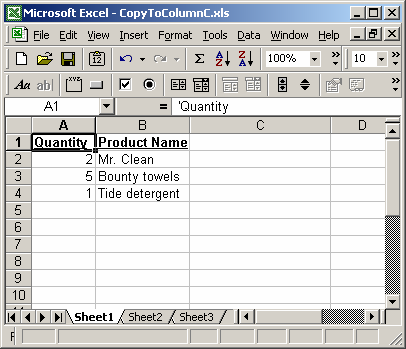
In our spreadsheet, we have our quantities listed in Column A and our product names listed in Column B.
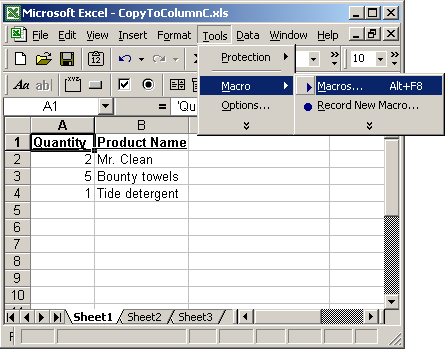
To run the macro, select Macro > Macros under the Tools menu.
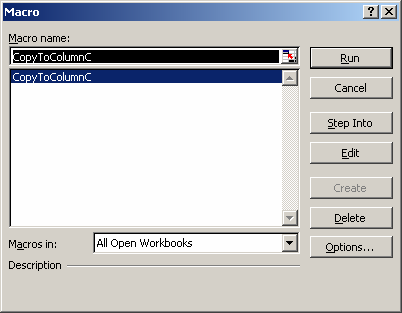
When the Macro window appears, select the macro called CopyToColumnC and click on the Run button.
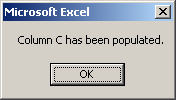
When the macro has completed, the above message box will appear.
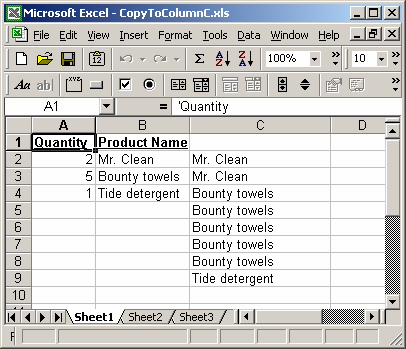
You should now see the product name appear in Column C, the number of times based on the value in the quantity column. In this case, Mr. Clean appears 2 times, Bounty towels appears 5 times, and Tide detergent appears 1 time.
You can press Alt+F11 to view the VBA code.
Macro Code
The macro code looks like this:
Sub CopyToColumnC()

   Dim LRow As Integer
   Dim LQty As Integer
   Dim LProduct As String
   Dim LColCPosition As Integer
   Dim j As Integer
   Dim LStart As Integer
   Dim LEnd As Integer

   'Search for values in column B starting at row 2
   LRow = 2

   'Copy values to column C starting at row 2
   LColCPosition = 2

   'Search through values in column B until a blank cell is encountered
   While Len(Range("B" & CStr(LRow)).Value) > 0

      'Retrieve quantity and product name
      LQty = Range("A" & CStr(LRow)).Value
      LProduct = Range("B" & CStr(LRow)).Value

      'Set start and end position for copy to column C
      LStart = LColCPosition
      LEnd = LColCPosition + LQty

      'Copy product name the number of times that is given by the quantity
      For j = LStart To LEnd - 1
         Range("C" & CStr(j)).Value = LProduct
      Next

      'Update column C position
      LColCPosition = LEnd

      LRow = LRow + 1

   Wend

   MsgBox "Column C has been populated."

End Sub
Advertisements