



MS Excel 2003: Extract hyperlink address (files and web addresses)
This Excel tutorial explains how to write a macro to extract both file and web hyperlink addresses in Excel 2003 and older versions (with screenshots and step-by-step instructions).
Question: In Microsoft Excel 2003/XP/2000/97, I have a spreadsheet that contains hyperlink addresses to files. I tried extracting the hyperlink address for these files, however I'm not getting the complete Address. The complete Address should be:
C:\My Documents\Past Projects\Centennial\Program Status Report.xls
But I only get:
\..\..\Past Projects\Centennial\Program Status Report.xls
Is there a way to always get the complete hyperlink address?
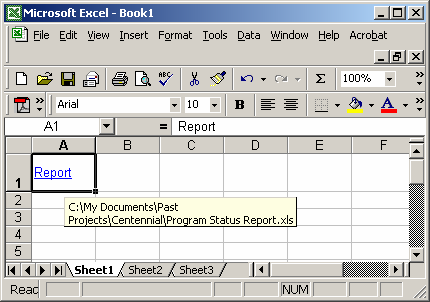
Answer: Below are two functions that you can include in your spreadsheet to extract the complete hyperlink address for either a file or a web address.
Function HyperLinkText(pRange As Range) As String

   Dim ST1 As String
   Dim ST2 As String
   Dim LPath As String
   Dim ST1Local As String

   If pRange.Hyperlinks.Count = 0 Then
      Exit Function
   End If

   LPath = ThisWorkbook.FullName

   ST1 = pRange.Hyperlinks(1).Address
   ST2 = pRange.Hyperlinks(1).SubAddress

   If Mid(ST1, 1, 15) = "..\..\..\..\..\" Then
      ST1Local = ReturnPath(LPath, 5) & Mid(ST1, 15)
   ElseIf Mid(ST1, 1, 12) = "..\..\..\..\" Then
      ST1Local = ReturnPath(LPath, 4) & Mid(ST1, 12)
   ElseIf Mid(ST1, 1, 9) = "..\..\..\" Then
      ST1Local = ReturnPath(LPath, 3) & Mid(ST1, 9)
   ElseIf Mid(ST1, 1, 6) = "..\..\" Then
      ST1Local = ReturnPath(LPath, 2) & Mid(ST1, 6)
   ElseIf Mid(ST1, 1, 3) = "..\" Then
      ST1Local = ReturnPath(LPath, 1) & Mid(ST1, 3)
   Else
      ST1Local = ST1
   End If

   If ST2 <> "" Then
      ST1Local = "[" & ST1Local & "]" & ST2
   End If

   HyperLinkText = ST1Local

End Function

Function ReturnPath(pAppPath As String, pCount As Integer) As String

   Dim LPos As Integer
   Dim LTotal As Integer
   Dim LLength As Integer

   LTotal = 0
   LLength = Len(pAppPath)

   Do Until LTotal = pCount + 1
      If Mid(pAppPath, LLength, 1) = "\" Then
         LTotal = LTotal + 1
      End If
      LLength = LLength - 1
   Loop

   ReturnPath = Mid(pAppPath, 1, LLength)

End Function
Then you can reference these new functions in your spreadsheet.
For example in cell B1, you could enter the following:
=HyperLinkText(A1)
Advertisements