



MS Excel 2003: Overwrite column B value when column A value is higher
This Excel tutorial explains how to write a macro to overwrite a value in one column when another value is higher in Excel 2003 and older versions (with screenshots and step-by-step instructions).
Question: In Microsoft Excel 2003/XP/2000/97, I have a spreadsheet that contains a regularly updated list of share prices downloaded from the web in column A. In column B, I want to (automatically) record the highest price each share has reached. So I want column B to increase to the value in column A, but only when column A > column B.
Answer: This can be done with a macro.
Let's look at an example.
Download Excel spreadsheet (as demonstrated below)
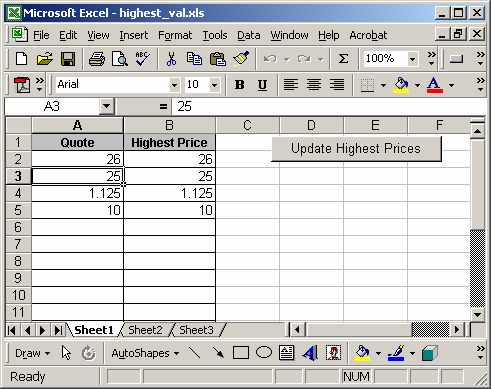
In our spreadsheet, the daily quotes are stored in column A and the highest prices are in column B.
We placed a button on the sheet that when clicked will update the values in column B if the corresponding value in column A is higher. When the macro is complete, the following message will appear.

To view the macro, press Alt+F11 and double-click on the module called Module1 in the left window.
You may need to modify the Lrows variable if the macro needs to check more than the first 200 rows in the spreadsheet.
Macro Code
This macro code looks like this:
Sub UpdateHighestPrices()

   Dim LLoop As Integer
   Dim Lrows As Integer
   Dim LQuote As String
   Dim LHighestVal As String

   'Update first 200 rows in spreadsheet with highest prices
   Lrows = 200

   LLoop = 2

   'Check first 200 rows in spreadsheet
   While LLoop <= Lrows
      LQuote = "A" & CStr(LLoop)
      LHighestVal = "B" & CStr(LLoop)

      'Update value in column b, if value in column B is higher
      If Range(LQuote).Value > Range(LHighestVal).Value Then
         Range(LHighestVal).Value = Range(LQuote).Value
      End If

      LLoop = LLoop + 1

   Wend

   MsgBox "The highest prices have been updated."

End Sub
Advertisements