



MS Excel 2003: Create custom function to exceed 7 nested If functions
This Excel tutorial explains how to create a custom function to test for more than 7 IF conditions in Excel 2003 and older versions (with screenshots and step-by-step instructions).
Question: In Microsoft Excel 2003/XP/2000/97, I have a formula that I am using to test for 7 conditions, and each condition if true will return a different value. However, I now need to test a total of 12 possible values. The limitation of the nested IFs is that you can only nest up to 7. Is there an alternative to this formula to test so that I can test for 12 values instead of 7?
=IF(A1="10X12",140,IF(A1="8x8",64,IF(A1="6x6",36,IF(A1="8x10",80,IF(A1="14x16",224,IF(A1="9x9",81,IF(A1="4x3",12)))))))
Answer: There is no built-in alternative formula in Excel, but you could write your own function in VBA and then call this new function instead.
Let's look at an example.
Download Excel spreadsheet (as demonstrated below)
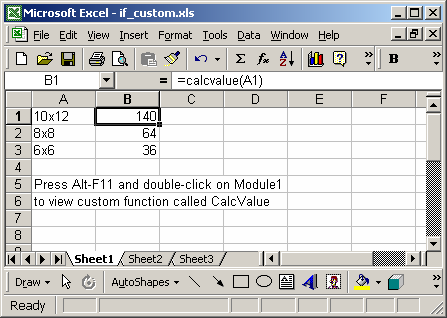
In our spreadsheet, we've created a custom VBA function called CalcValue. This function accepts as a parameter a cell and returns a value based on a complex IF THEN ELSE statement. You can use this method to nest up to or more than 7 IF conditions.
You can press Alt+F11 to view the VBA code.
Macro Code
The macro code looks like this:
Function CalcValue(pVal As String) As Long

   If pVal = "10x12" Then
      CalcValue = 140

   ElseIf pVal = "8x8" Then
      CalcValue = 64

   ElseIf pVal = "6x6" Then
      CalcValue = 36

   ElseIf pVal = "8x10" Then
      CalcValue = 80

   ElseIf pVal = "14x16" Then
      CalcValue = 224

   ElseIf pVal = "9x9" Then
      CalcValue = 81

   ElseIf pVal = "4x3" Then
      CalcValue = 12

   Else
      CalcValue = 0
   End If

End Function
Advertisements