



MS Excel 2003: Counting matched pairs
This Excel tutorial explains how to write a macro to count the number of matching pairs in Excel 2003 and older versions (with screenshots and step-by-step instructions).
Question: In Microsoft Excel 2003/XP/2000/97, I have a spreadsheet that contains the winning numbers for a lottery. I'd like to count the number of times a pair of numbers occurs in the various draws. How can I do this?
Answer: This can be done using VBA code to generate the matched pair counts and then the VLOOKUP function to move the results into a matrix.
Let's look at an example.
Download Excel spreadsheet (as demonstrated below)
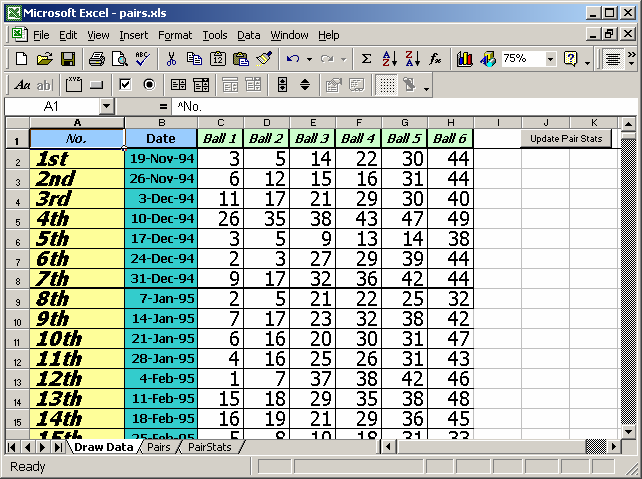
In this example spreadsheet, we have a sheet called "Draw Data" that contains the winning numbers for several draws. On this sheet is a button called "Update Pair Stats" that calls a macro called UpdatePairStats.
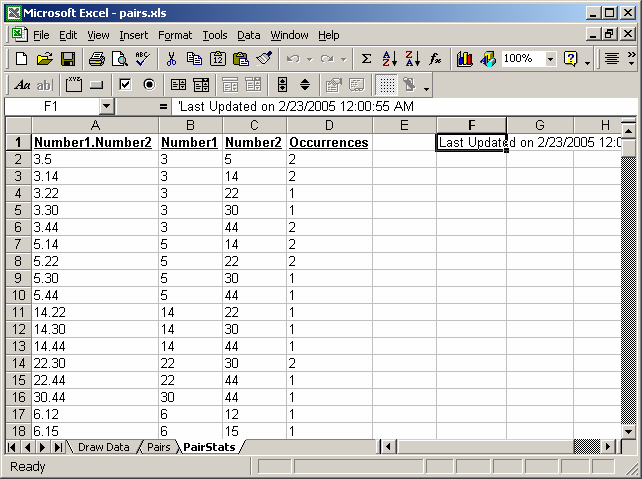
When the macro runs, it will populate a sheet called "PairStats" with the matched pair counts as follows:
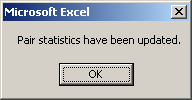
When the macro has completed, the following message box will appear:
On the sheet called Pairs, you will see that the matrix has been filled in with the matched pair counts (based on a VLOOKUP formula).
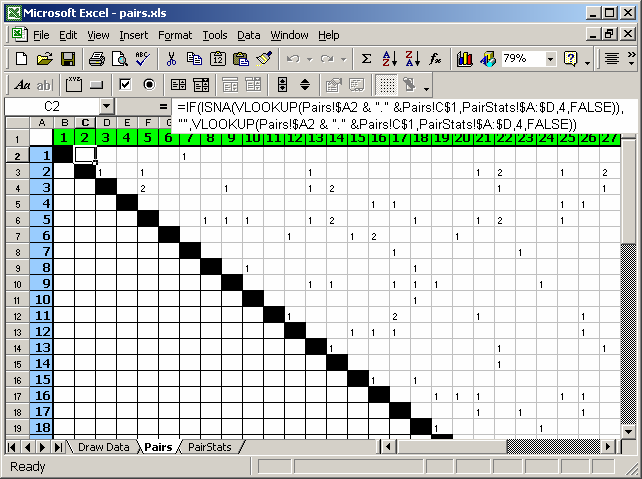
The matrix uses the following formula (cell C2 contains the following formula):
=IF(ISNA(VLOOKUP(Pairs!$A2 & "." &Pairs!C$1,PairStats!$A:$D,4,FALSE)),"",VLOOKUP(Pairs!$A2 & "." &Pairs!C$1,PairStats!$A:$D,4,FALSE))
What this formula does is perform a VLOOKUP for the concatenated numbers (separated with a "."). If no match is found, it returns an empty string ("").
You can press Alt+F11 to view the VBA code.
Macro Code
The macro code looks like this: (and is found in Module1)
Sub UpdatePairStats()

   Dim LRange As Variant
   Dim LRows As Long
   Dim LCols As Long
   Dim C As New Collection
   Dim LItem As Long
   Dim LDesc As String
   Dim Counts(10000, 4) As String
   Dim i As Long, j As Long, k As Long

   On Error Resume Next

   'Select sheet where data resides
   Sheets("Draw Data").Select

   'Data range (where draw information resides)
   LRange = Range("C2:H1151")

   LRows = UBound(LRange, 1)
   LCols = UBound(LRange, 2)

   'Loop through each row in LRange (find pairs)
   For i = 1 To LRows

      'j and k create the pairs
      For j = 1 To LCols - 1

         For k = j + 1 To LCols
            'Separate pairs with a "." character (smaller number first)
            If LRange(i, j) < LRange(i, k) Then
               LDesc = LRange(i, j) & "." & LRange(i, k)
            Else
               LDesc = LRange(i, k) & "." & LRange(i, j)
            End If

            'Add new item to collection ("on error resume next" is
            'required above in this procedure because of this line of code)
            C.Add C.Count + 1, LDesc

            'Retrieve indexnumber of new item
            LItem = C(LDesc)

            'Add pair information to new item
            If Counts(LItem, 0) = "" Then
               Counts(LItem, 0) = LDesc
               Counts(LItem, 1) = LRange(i, j)
               Counts(LItem, 2) = LRange(i, k)
            End If

            'Increment stats counter
            If Counts(LItem, 3) = "" Then
               Counts(LItem, 3) = "1"
            Else
               Counts(LItem, 3) = CStr(CInt(Counts(LItem, 3)) + 1)
            End If

         Next k
      Next j
   Next i

   'Paste pairs onto sheet called PairStats
   Sheets("PairStats").Select
   Cells.Select
   Selection.Clear
   Cells(1, 1).Resize(C.Count, 4) = Counts

   'Format headings
   Range("A1").FormulaR1C1 = "'Number1.Number2"
   Range("B1").FormulaR1C1 = "'Number1"
   Range("C1").FormulaR1C1 = "'Number2"Range("D1").FormulaR1C1 = "'Occurrences"

   Range("A1:D1").Select
   Selection.Font.Bold = True
   Selection.Font.Underline = xlUnderlineStyleSingle

   Columns("A:D").EntireColumn.AutoFit
   Range("F1").Select
   Range("F1").FormulaR1C1 = "Last Updated on " & Now()

   Sheets("Pairs").Select
   MsgBox "Pair statistics have been updated."

End Sub
Please note that you will have to customize the LRange variable to match the number of rows and columns for your data.
Advertisements