



MS Excel 2003: Rearrange data in an export of raw data
This Excel tutorial explains how to write a macro to rearrange data in an export of raw data in Excel 2003 and older versions (with screenshots and step-by-step instructions).
Question: In Microsoft Excel 2003/XP/2000/97, I have a spreadsheet that contains an export of some raw data. However, the data needs to be rearranged as follows:
If cell M? displays "Contract Information" then copy and paste cells O-S into cell M of the same row
If cell K? displays "Location" then cut and paste cells K-AD into cell T of the same row. Then copy and paste the previous row's cells K-S down to K into this row
Copy down the category name in Column L replacing "Loads"
Answer: Let's look at an example.
Download Excel spreadsheet (as demonstrated below)
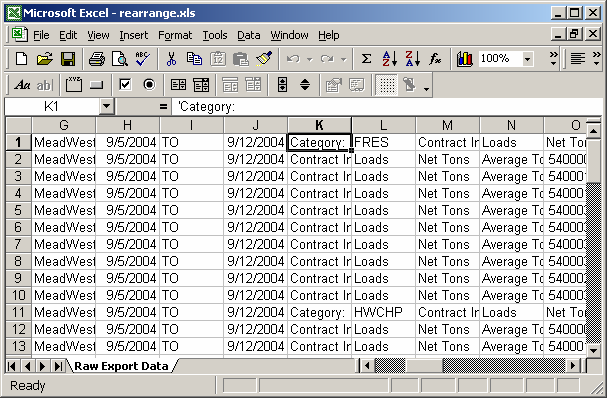
In this spreadsheet, we've created a macro called RearrangeData. You can run the macro by selecting Macro > Macros under the Tools menu. Then highlighting the macro called RearrangeData and clicking on the Run button.
Once the macro has run, the spreadsheet will look as follows:
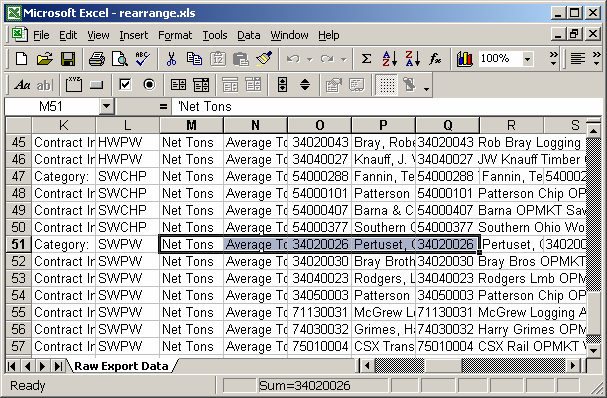
You can press Alt+F11 to view the VBA code.
Macro Code
The macro code looks like this:
Sub RearrangeData()

   Dim LRow As Integer
   Dim LCategory As String

   LRow = 1
   LCategory = ""

   'Move through records until an empty cell is found in column A
   While IsEmpty(Range("A" & CStr(LRow)).Value) = False
      'If cell M? displays "Contract Information" then copy and paste
      'cells O-S into cell M of the same row
      If Range("M" & CStr(LRow)).Value = "Contract Information" Then
         Range("O" & LRow & ":S" & LRow).Select
         Selection.Copy
         Range("M" & LRow).Select
         ActiveSheet.Paste
      End If

      'If cell K? displays "Location" then cut and paste cells K-AD into
      'cell T of the same row. Then copy and paste the previous row's
      'cells K-S down to K into this row
      If Range("K" & CStr(LRow)).Value = "Location" Then
         'Cut and paste cells K-AD into cell T of the same row
         Range("K" & LRow & ":AD" & LRow).Select
         Selection.Cut
         Range("T" & LRow).Select
         ActiveSheet.Paste

         'Copy and paste the previous row's cells K-S down to K
         'into this row
         Range("K" & LRow - 1 & ":S" & LRow - 1).Select
         Selection.Copy
         Range("K" & LRow).Select
         ActiveSheet.Paste

      End If

      'Copy down the category name in Column L replacing "Loads"
      If Range("L" & CStr(LRow)).Value = "Loads" Then
         Range("L" & CStr(LRow)).Value = LCategory
      'Next category name
      Else
         LCategory = Range("L" & CStr(LRow)).Value
      End If

      LRow = LRow + 1
   Wend

End Sub
Advertisements