



MS Excel 2003: Test for duplicates on partial cell contents in a column
This Excel tutorial explains how to write a macro to test for duplicates on partial cells contents in a column in Excel 2003 and older versions (with screenshots and step-by-step instructions).
Question: In Microsoft Excel 2003/XP/2000/97, is it possible to write a macro which would highlight any duplicate values by comparing partial cell contents in column A? My problem is that sometimes the cell values do not match exactly.
For example, cell A1 contains "1234" and cell A2 contains "1234, 5678". Is there a way to compare partial cell contents so that a duplicate entry flag would be set for cells A1 and A2 in this example?
Answer: Let's look at an example.
Download Excel spreadsheet (as demonstrated below)
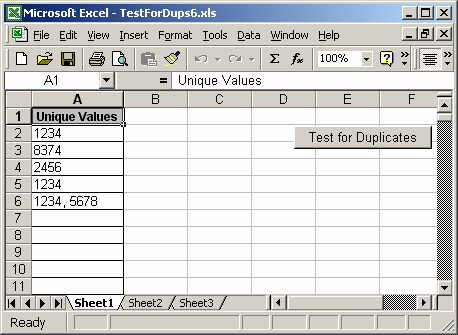
In our spreadsheet, we've set up column A to contain unique values. On this sheet, we've created a button that when clicked will launch a macro. This macro will highlight any duplicate values in column A.
In our example, we've clicked on the button. Now the background color of the partial duplicates will turn red as follows:
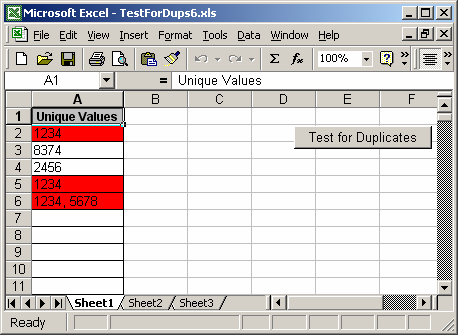
In this example, the partial value of 1234 has been entered in cells A2, A5, and A6.
You can press Alt+F11 to view the VBA code.
Please note that the LRows variable in this macro is set to 200 indicating that the macro will test the first 200 rows in column A for duplicates. You may need to change this value to accommodate your volume of data.
Macro Code
The macro code looks like this:
Sub TestForDups()

   Dim LLoop As Integer
   Dim LTestLoop As Integer
   Dim LClearRange As String
   Dim Lrows As Integer
   Dim LRange As String
   Dim LChangedValue As String
   Dim LTestValue As String

   'Test first 200 rows in spreadsheet for uniqueness
   Lrows = 200
   LLoop = 2

   'Clear all flags
   LClearRange = "A2:A" & Lrows
   Range(LClearRange).Interior.ColorIndex = xlNone

   'Check first 200 rows in spreadsheet
   While LLoop <= Lrows
      LChangedValue = "A" & CStr(LLoop)

      If Len(Range(LChangedValue).Value) > 0 Then
         'Test each value for uniqueness
         LTestLoop = 2
         While LTestLoop <= Lrows
            If LLoop <> LTestLoop Then
               LTestValue = "A" & CStr(LTestLoop)
               'Value has been duplicated in another cell
               If InStr(Range(LTestValue).Value, Range(LChangedValue).Value) > 0 Then
                  'Set the background color to red
                  Range(LChangedValue).Interior.ColorIndex = 3
                  Range(LTestValue).Interior.ColorIndex = 3

               End If

            End If

            LTestLoop = LTestLoop + 1

         Wend

      End If

      LLoop = LLoop + 1

   Wend

End Sub
Advertisements