



MS Excel 2003: GetPivotData Example #1
This Excel tutorial explains how to use the GetPivotData function (example #1) in Excel 2003 and older versions (with screenshots and step-by-step instructions).
In Microsoft Excel 2003/XP/2000/97, the GetPivotData function returns data from a pivot table. It can retrieve summary data from a pivot table as long as the summary data is visible.
Syntax
The syntax for the GetPivotData function is:
GetPivotData( pivot_table, name )
Parameters or Arguments
- pivot_table
- It is generally a named range that has been set up to point to the pivot table.
- name
- The name of the summary value that you wish to retrieve.
Example
Let's look at an example.
Below we have an Excel spreadsheet that has a pivot table on Sheet2. We've set up a named range called PivotTable that references this pivot table (Sheet2!$A:$E).
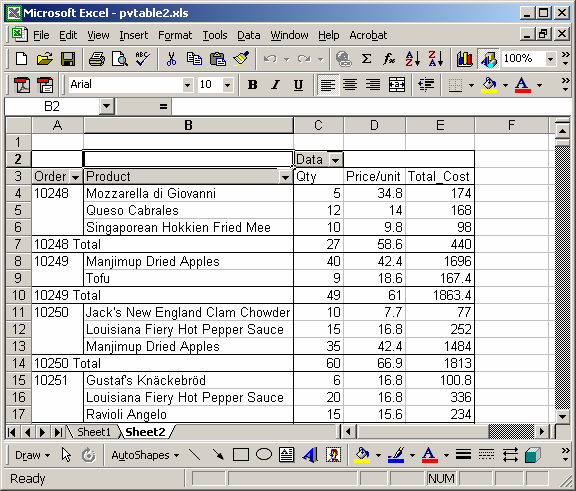
=GetPivotData(PivotTable,"10249 Qty")
Result: 49

=GetPivotData(PivotTable,"10249 Price/unit")
Result: 61

=GetPivotData(PivotTable,"10249 Total_Cost")
Result: 1863.4

=GetPivotData(PivotTable,"10249 Tofu Total_Cost")
Result: 167.4
Advertisements