



MS Excel 2003: Remove subtotals on pivot table rows
This Excel tutorial explains how to remove subtotals from the rows in a pivot table in Excel 2003 and older versions (with screenshots and step-by-step instructions).
See solution in other versions of Excel:
Question: In Microsoft Excel 2003/XP/2000/97, how do I remove subtotals on a pivot table row?
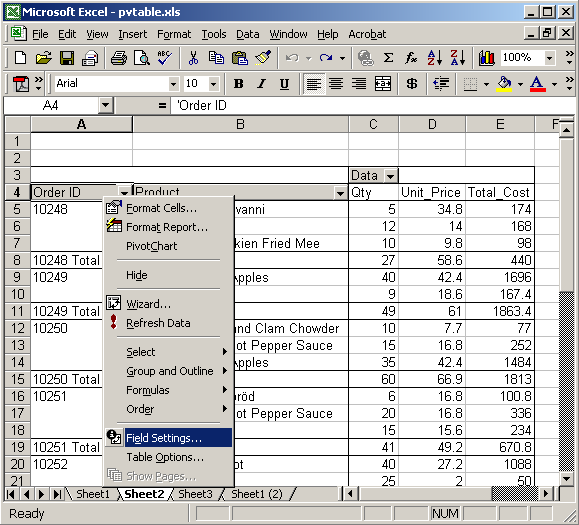
Answer: Select the row heading that you wish to remove subtotals on. Right-click and then select "Field Settings" from the popup menu. In this example, we've chosen the row heading called Order ID.
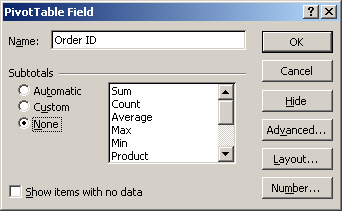
When the PivotTable Field window appears, select the "None" subtotals option. Click on the OK button.
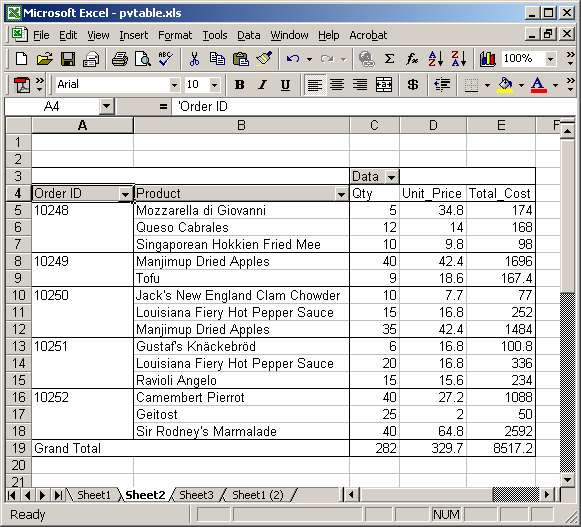
Now when you return to the spreadsheet, the subtotals for each OrderID are no longer visible.
Advertisements