



MS Excel 2003: Use an array formula to count ranges of times
This Excel tutorial explains how to use an array formula to count ranges of times in Excel 2003 and older versions (with screenshots and step-by-step instructions).
Question: In Microsoft Excel 2003/XP/2000/97, I have a list of time values in column B. I need to count the values that are before 8:00am, the values that fall between 8:00am and 8:19am, and the values that are after 10:00am.
How can I do this?
Answer: This can be done in Excel with an array formula.
Let's look at an example.
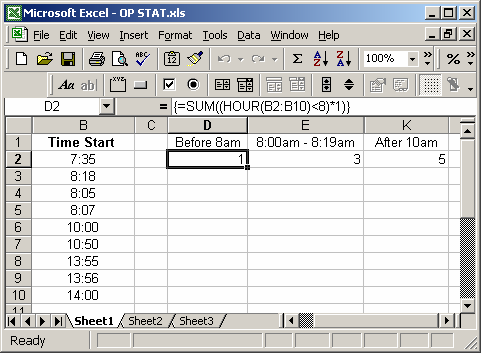
In cell D2, we've created the following array formula that uses the SUM and HOUR functions:
=SUM((HOUR(B2:B10)<8)*1)
When creating your array formula, you need to use Ctrl+Shift+Enter instead of Enter. This creates {} brackets around your formula as follows:
{=SUM((HOUR(B2:B10)<8)*1)}
This formula would return the number of time values that are before 8:00am.
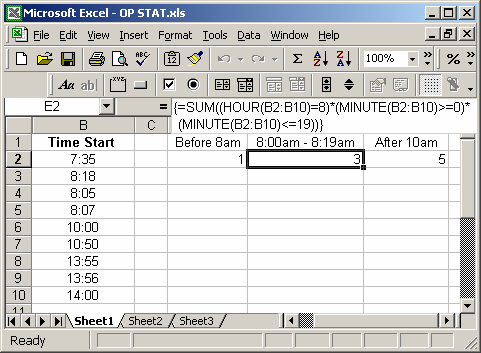
In cell E2, we've created the following array formula:
=SUM((HOUR(B2:B10)=8)*(MINUTE(B2:B10)>=0)*(MINUTE(B2:B10)<=19))
When creating your array formula, you need to use Ctrl+Shift+Enter instead of Enter. This creates {} brackets around your formula as follows:
{=SUM((HOUR(B2:B10)=8)*(MINUTE(B2:B10)>=0)*(MINUTE(B2:B10)<=19))}
This formula would return the number of time values that fall between 8:00am and 8:19am.
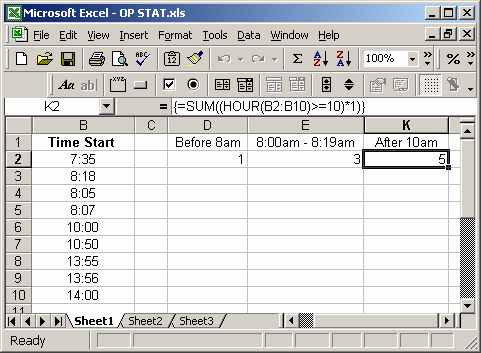
In cell K2, we've created the following array formula:
=SUM((HOUR(B2:B10)>=10)*1)
When creating your array formula, you need to use Ctrl+Shift+Enter instead of Enter. This creates {} brackets around your formula as follows:
{=SUM((HOUR(B2:B10)>=10)*1)}
This formula would return the number of time values that are after 10:00am (including 10:00am exactly).
Advertisements