



MS Excel 2003: Calculate the incremental difference in a running total column even when blank values are found in the series
This Excel tutorial explains how to calculate the incremental difference in a running total column even when blank values are found in the series in Excel 2003 and older versions (with screenshots and step-by-step instructions).
Question: In Microsoft Excel 2003/XP/2000/97, I have a spreadsheet that lists a running total in column B. In column C, I'd like to calculate how much the value has increased for each row. For example, I've done this with the following formula in cell C7:
=B7-B6
This formula works fine if column B always has a value, but if a row is missed then it stops working. How can I write a formula that returns 0 if no value is found in column B, but then picks up calculating the difference when a value is found?
Answer: Let's look at an example.
Download Excel spreadsheet (as demonstrated below)
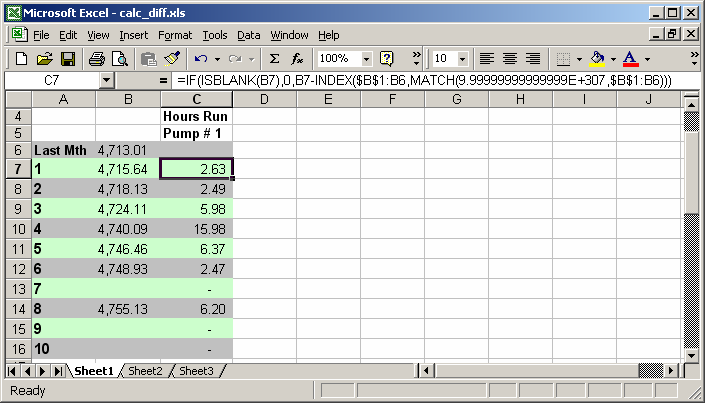
First, we have column B that lists a running total. Column C needs to calculate the incremental increase between the rows in column B.
In cell B2, we've created the following formula that uses the IBLANK, INDEX and MATCH functions:
=IF(ISBLANK(B7),0,B7-INDEX($B$1:B6,MATCH(9.99999999999999E+307,$B$1:B6)))
This formula will check if the value in column B is blank using the ISBLANK function. If it is blank, then it will return 0. Otherwise, it will subtract from cell B7 the last numeric value found in the range B1:B6 using the INDEX function and the MATCH function.
Advertisements