



MS Excel 2003: Freeze top row
This Excel tutorial explains how to freeze panes to keep the top row visible when scrolling in Excel 2003 and older versions (with screenshots and step-by-step instructions).
See solution in other versions of Excel:
Question: In Microsoft Excel 2003/XP/2000/97, I have a spreadsheet with column headings. I need a way to scroll down the rows, but still see the column headings that are contained in the top row. How can I do this?
Answer: If you need to see the column headings even after scrolling, you could try freezing the pane in Excel.
To freeze the top row, open your Excel spreadsheet.
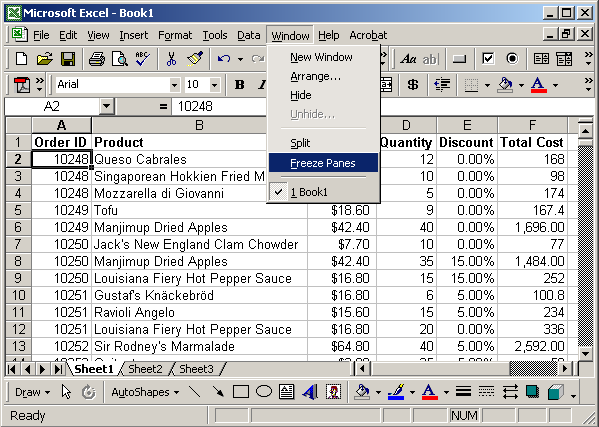
Select the cell that is below the left-most column heading that you wish to see. Then under the Window menu, select Freeze Panes.
In our example, we've selected cell A2 which is just below the "Order ID" heading.
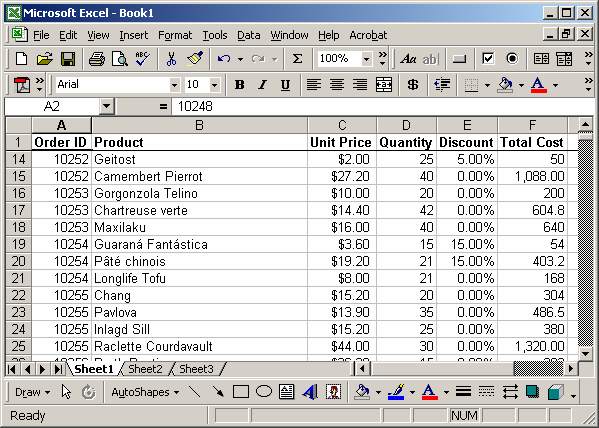
Now when you scroll down, you should still continue to see the column headings.
Advertisements