



MS Excel 2003: Set up groups of radio buttons on a form to function independently
This Excel tutorial explains how to set up groups of radio buttons on a form to function independently in Excel 2003 and older versions.
Question: In Microsoft Excel 2003/XP/2000/97, I've created a form that uses a series of radio buttons. The tricky part is that I have 3 different groupings of radio buttons and I need each group of radio buttons to function independently (as they perform different functions).
The first group has 4 radio buttons in it, the next group has 8, and the last group has 3 radio button. How can I do this?
Answer: It is possible to have different sets of radio buttons perform independently by placing your radio buttons inside of frames.
Let's look at an example.
Download Excel spreadsheet (as demonstrated below)
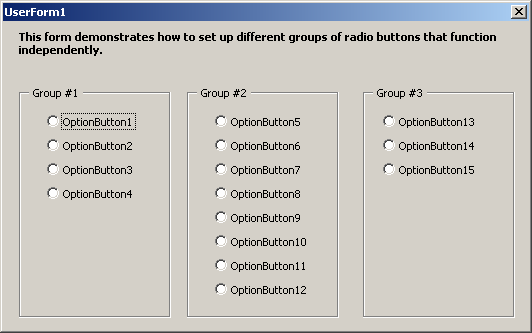
In this example we've created a form called UserForm1 that opens automatically when the spreadsheet is opened.
On UserForm1, we've created 3 frame objects labelled as Group #1, Group #2, and Group #3. Within each of these frames, we've placed radio buttons. Group #1 contains 3 radio buttons, Group #2 contains 8 radio buttons, and Group #3 contains 4 radio buttons.
Each group of radio buttons contained within a frame will function independently of the other groups.
To view the form in Design mode, close the form and then press Alt+F11.
Advertisements