



MS Access: Concatenate strings together
This MSAccess tutorial explains how to use the Access & operator to conatentate strings together with syntax and examples.
Description
In Microsoft Access, you can concatenate multiple strings together into a single string with the & operator.
Syntax
The syntax to concatenate strings using the & operator in MS Access is:
string_1 & string_2 & string_n
Parameters or Arguments
There are no parameters or arguments for the & operator.
Applies To
The & operator can be used in the following versions of Microsoft Access:
- Access 2019, Access 2016, Access 2013, Access 2010, Access 2007, Access 2003, Access XP, Access 2000
Example
Let's look at how to use the & operator in MS Access:
"new" & "ark"
Result: "newark"

"Tech on the" & " Net!"
Result: "Tech on the Net!"

"This " & "is " & "a test"
Result: "This is a test"
Concatenate Space Characters
When you are concatenating values together, you might want to add space characters to separate your concatenated values. Otherwise, you might get a long string with the concatenated values running together. This makes it very difficult to read the results.
Let's look at an easy example.
We can concatenate a space character using the & operator.
For example:
"Sarah" & " " & "Johnson"
Result: "Sarah Johnson"
In this example, we have used the & operator to add a space character between the values Sarah and Johnson. This will prevent our values from being squished together.
Instead our result would appear as follows:
"Sarah Johnson"
Concatenate Quotation Marks
Since the & operator will concatenate string values that are enclosed in quotation marks, it isn't straight forward how to add a quotation mark character to the concatenated results.
Let's look at a fairly easy example that shows how to add a quotation mark to the resulting concatenated string using the & operator.
For example:
"Orange " & """" & " Pear"
Result: Orange " Pear
In this example, we have used the & operator to add a quotation mark to the middle of the resulting string.
Since our strings to concatenate are enclosed in quotation marks, we use 2 additional quotation marks within the surrounding quotation marks to represent a quotation mark in our result as follows:
""""
Then when you put the whole function call together:
"Orange " & """" & " Pear"
You will get the following result:
Orange " Pear
Example in VBA Code
The & operator can be used to concatenate strings in VBA code.
For example:
Dim LSQL as string

LSQL = "Select * from Suppliers"
LSQL = LSQL & " where Supplier_ID = 2345"
Example in SQL/Queries
You can use the & operator in a query to concatenate multiple fields into a single field in your result set.
To do this, open your query in design mode. Enter your field names in the query window separated by the & symbol.
For example:
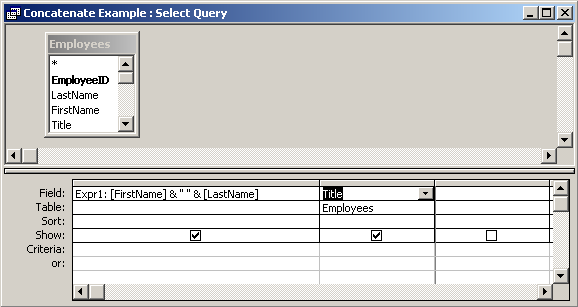
In this query, we have used the & operator as follows:
Expr1: [FirstName] & " " & [LastName]
This query will return the concatenation of the FirstName field , a space character, and the [LastName] field. The results will be displayed in a column called Expr1. You can replace Expr1 with a column name that is more meaningful.
For example:
FullName: [FirstName] & " " & [LastName]
The results would now be displayed in a column called FullName.
Advertisements