



MS Excel 2003: Use an array formula to count the number of children who will attend lunch
This Excel tutorial explains how to use an array formula to count the number of children who will attend lunch in Excel 2003 and older versions (with screenshots and step-by-step instructions).
Question: I’m trying to create a formula in Microsoft Excel 2003/XP/2000/97. I have a situation where the user in a daycare center needs to count the number of children that will be in attendance at lunch time. Here is what the spreadsheet looks like:
| Column A | Column B | Column C |
|---|---|---|
| Name: | Monday In | Monday Out |
| Joe | 8:00 AM | 1:00 PM |
| Mary | 9:30 AM | 12:00 PM |
| Cindy | 7:00 AM | 11:30 PM |
| Sam | 8:00 AM | 5:00 PM |
| Isaac | 12:00 PM | 6:00 PM |
| Daylon | 7:30 AM | 12:00 PM |
| Robert | 9:00 AM | 6:00 PM |
| Alliah | 11:00 AM | 4:00 PM |
The formula needs to count only those kids where the value in column B is less than 12:00PM and the value in column C is greater than 12:00PM. Lunch is served at 12 noon so only 5 of the 8 listed above would remain to have lunch.
How can I do this?
Answer: This can be done in Excel with an array formula.
Let's look at an example.
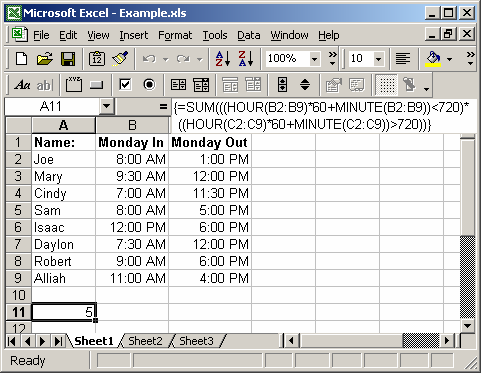
In cell A11, we've created the following array formula that uses the SUM, HOUR and MINUTE functions:
=SUM(((HOUR(B2:B9)*60+MINUTE(B2:B9))<720)*((HOUR(C2:C9)*60+MINUTE(C2:C9))>720))
When creating your array formula, you need to use Ctrl+Shift+Enter instead of Enter. This creates {} brackets around your formula as follows:
{=SUM(((HOUR(B2:B9)*60+MINUTE(B2:B9))<720)*((HOUR(C2:C9)*60+MINUTE(C2:C9))>720))}
What this formula does is convert the time values in column B and column C into minutes, then count only those kids where the time value in column B is less than 720 minutes (ie: 12:00PM) and the time value in column C is greater than 720 minutes (ie: 12:00PM).
To explain further, 12:00PM = (12 hours * 60 minutes) which equals 720 minutes.
Advertisements