



MS Excel: How to use the MINUTE Function (WS, VBA)
This Excel tutorial explains how to use the Excel MINUTE function with syntax and examples.
Description
The Microsoft Excel MINUTE function returns the minutes (a number from 0 to 59) from a time value.
The MINUTE function is a built-in function in Excel that is categorized as a Date/Time Function. It can be used as a worksheet function (WS) and a VBA function (VBA) in Excel. As a worksheet function, the MINUTE function can be entered as part of a formula in a cell of a worksheet. As a VBA function, you can use this function in macro code that is entered through the Microsoft Visual Basic Editor.
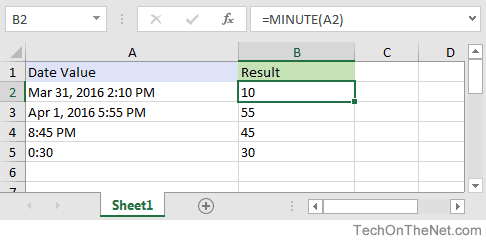
If you want to follow along with this tutorial, download the example spreadsheet.
Syntax
The syntax for the MINUTE function in Microsoft Excel is:
MINUTE( serial_number )
Parameters or Arguments
- serial_number
- The time value to extract the minutes from. It may be expressed as a string value, a decimal number, or the result of a formula.
Returns
The MINUTE function returns a numeric value between 0 and 59.
Applies To
- Excel for Office 365, Excel 2019, Excel 2016, Excel 2013, Excel 2011 for Mac, Excel 2010, Excel 2007, Excel 2003, Excel XP, Excel 2000
Type of Function
- Worksheet function (WS)
- VBA function (VBA)
Example (as Worksheet Function)
Let's look at some Excel MINUTE function examples and explore how to use the MINUTE function as a worksheet function in Microsoft Excel:
Based on the spreadsheet above, the following Excel MINUTE function would return the following values:
=MINUTE(A2)
Result: 10

=MINUTE(A3)
Result: 55

=MINUTE(A4)
Result: 45

=MINUTE(A5)
Result: 30

=MINUTE("4:00:00 AM")
Result: 0

=MINUTE("4:30:00 AM")
Result: 30
Example (as VBA Function)
The MINUTE function can be used in VBA code in Microsoft Excel.
Let's look at some Excel MINUTE function examples and explore how to use the MINUTE function in Excel VBA code:
Dim LMinute As Integer

LMinute = Minute("10:13:58 AM")
In this example, the variable called LMinute would now contain the value of 13.
Frequently Asked Questions
Question:How does one write the IF for time? For instance, if A1 is less than 0:30 then use A1. If A1 is greater then 0:30 then return 0. In cell A1, I have the value 0:04.
I wrote the formula like this:
=IF(A1<:30,A1,0)
It returned 0:04 but when I tried 0:45 in cell A1, it returned 0:45. Thanks!
Answer: If you are using your IF function to test the number of minutes, you can use the MINUTE function as follows:
=IF(MINUTE(A1)<30,A1,0)
Make sure you apply a time format to the cell that contains the formula so that you see the result as 0:00 or 0:30. Otherwise, the cell will display a fractional number.
Advertisements