



MS Excel 2007: Wrap text in merged cells
This Excel tutorial explains how to wrap text in merged cells in Excel 2007 (with screenshots and step-by-step instructions).
See solution in other versions of Excel:
Question: How do I wrap text in merged cells in Microsoft Excel 2007?
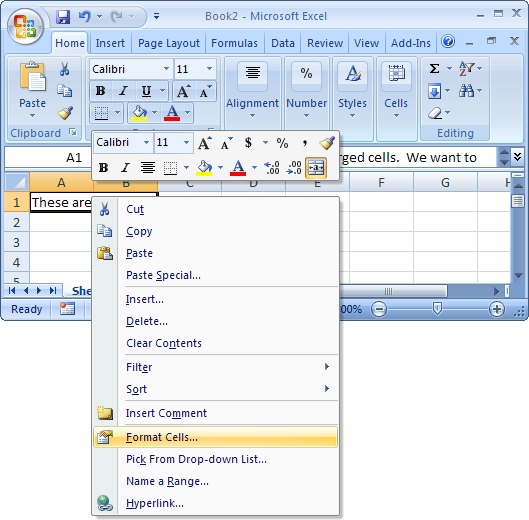
Answer:Select the merged cells that you wish to wrap text. Right-click and then select "Format Cells" from the popup menu.
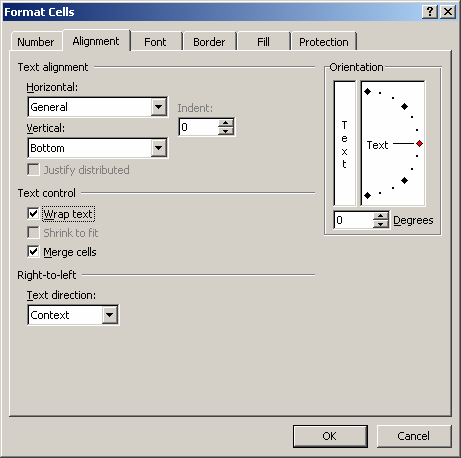
When the Format Cells window appears, select the Alignment tab. Check the "Wrap text" checkbox.
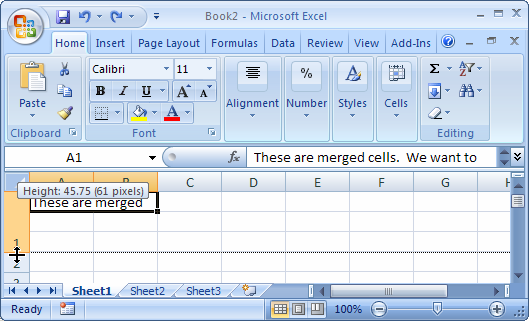
Now when you return to the spreadsheet, you will need to manually adjust the height of the row that contains the merged cells. To do this, position your mouse pointer over the bottom of the row until a double arrowed pointer appears. Then hold down the left mouse button and drag downward. Release the left mouse button when the row is the desired height.
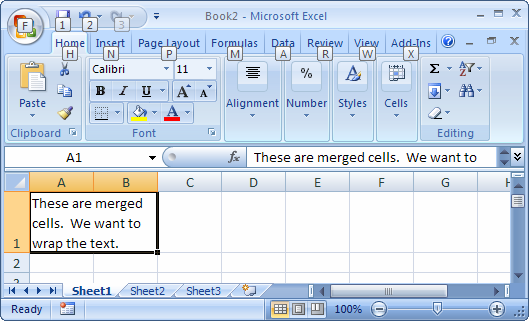
Now when you view the contents of the merged cells, you will be able to see that the text is wrapping.


Advertisements