



MS Excel: How to use the AND Function (WS)
This Excel tutorial explains how to use the Excel AND function with syntax and examples.
Description
The Microsoft Excel AND function returns TRUE if all conditions are TRUE. It returns FALSE if any of the conditions are FALSE.
The AND function is a built-in function in Excel that is categorized as a Logical Function. It can be used as a worksheet function (WS) in Excel. As a worksheet function, the AND function can be entered as part of a formula in a cell of a worksheet.
Please read our AND function (VBA) page if you are looking for the VBA version of the AND function as it has a very different syntax.
Syntax
The syntax for the AND function in Microsoft Excel is:
AND( condition1, [condition2], ... )
Parameters or Arguments
- condition1
- The first condition to test whether it is TRUE or FALSE.
- condition2, ...
- Optional. Additional conditions to test whether they are TRUE or FALSE. There can be up to 30 conditions in total.
Returns
The AND function returns TRUE if all conditions are TRUE.
The AND function returns FALSE if any of the conditions are FALSE.
Applies To
- Excel for Office 365, Excel 2019, Excel 2016, Excel 2013, Excel 2011 for Mac, Excel 2010, Excel 2007, Excel 2003, Excel XP, Excel 2000
Type of Function
- Worksheet function (WS)
Example (as Worksheet Function)
Let's look at some Excel AND function examples and explore how to use the AND function as a worksheet function in Microsoft Excel:
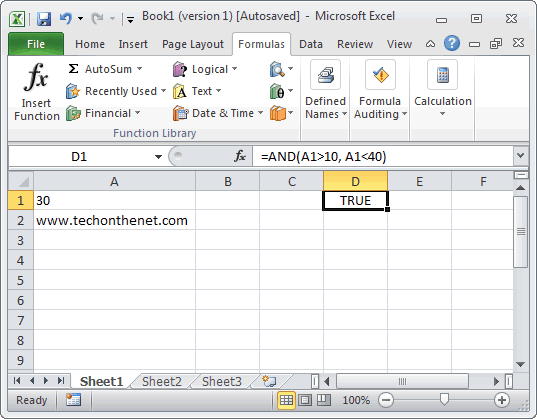
Based on the Excel spreadsheet above, the following AND examples would return:
=AND(A1>10, A1<40)
Result: TRUE

=AND(A1=30, A2="www.checkyourmath.com")
Result: FALSE

=AND(A1>=5, A1<=30, A2="www.techonthenet.com")
Result: TRUE
Frequently Asked Questions
Question: I need to translate some Quattro Pro functions to Excel. The #AND# function in Qpro can be placed in the middle of a nest and return a number. For example, @if(.......A1>B1#and#A1<B3,7,0)
What this says is, after some other function, if A1 is greater than B1 and A1 is less than B3, return 7 otherwise 0. How do I get Excel to do this?
Answer: This can be done in Excel by combining the AND function with the IF function like this:
=IF(AND(A1>B1,A1<B3)=TRUE,7,0)
Question: In Microsoft Excel, I'm trying to use the If function to return 25 if cell A1 > 100 and cell B1 < 200. Otherwise, it should return 0.
Answer: You can use the AND function to perform an AND condition in the If function as follows:
=IF(AND(A1>100,B1<200),25,0)
In this example, the formula will return 25 if cell A1 is greater than 100 and cell B1 is less than 200. Otherwise, it will return 0.
Question: In Microsoft Excel, I want to write a formula for the following logic:
If R1 AND R2<0.3 AND R3<0.42 THEN "OK" OTHERWISE "NOT OK"
Answer: You can write an IF statement that uses the AND function as follows:
=IF(AND(R1<0.3,R2<0.3,R3<0.42),"OK","NOT OK")
Question: I have been looking at your Excel IF, AND and OR sections and found this very helpful, however I cannot find the right way to write a formula to express if C2 is either 1,2,3,4,5,6,7,8,9 and F2 is F and F3 is either D,F,B,L,R,C then give a value of 1 if not then 0. I have tried many formulas but just can't get it right, can you help please?
Answer: You can write an IF statement that uses the AND function and the OR function as follows:
=IF(AND(C2>=1,C2<=9, F2="F",OR(F3="D",F3="F",F3="B",F3="L",F3="R",F3="C")),1,0)
Question:In Excel, I am trying to create a formula that will show the following:
If column B = Ross and column C = 8 then in cell AB of that row I want it to show 2013, If column B = Block and column C = 9 then in cell AB of that row I want it to show 2012.
Answer:You can create your Excel formula using nested IF functions with the AND function.
=IF(AND(B1="Ross",C1=8),2013,IF(AND(B1="Block",C1=9),2012,""))
This formula will return 2013 as a numeric value if B1 is "Ross" and C1 is 8, or 2012 as a numeric value if B1 is "Block" and C1 is 9. Otherwise, it will return blank, as denoted by "".
Advertisements