



MS Excel: How to use the DOLLAR Function (WS)
This Excel tutorial explains how to use the Excel DOLLAR function with syntax and examples.
Description
The Microsoft Excel DOLLAR function converts a number to text, using a currency format. The format used is $#,##0.00_);($#,##0.00).
The DOLLAR function is a built-in function in Excel that is categorized as a String/Text Function. It can be used as a worksheet function (WS) in Excel. As a worksheet function, the DOLLAR function can be entered as part of a formula in a cell of a worksheet.
Syntax
The syntax for the DOLLAR function in Microsoft Excel is:
DOLLAR( number, [decimal_places] )
Parameters or Arguments
- number
- The number to convert to text.
- decimal_places
- Optional. It is the number of decimal places to display. The number will be rounded accordingly.
Returns
The DOLLAR function returns a string/text value.
Applies To
- Excel for Office 365, Excel 2019, Excel 2016, Excel 2013, Excel 2011 for Mac, Excel 2010, Excel 2007, Excel 2003, Excel XP, Excel 2000
Type of Function
- Worksheet function (WS)
Example (as Worksheet Function)
Let's look at some Excel DOLLAR function examples and explore how to use the DOLLAR function as a worksheet function in Microsoft Excel:
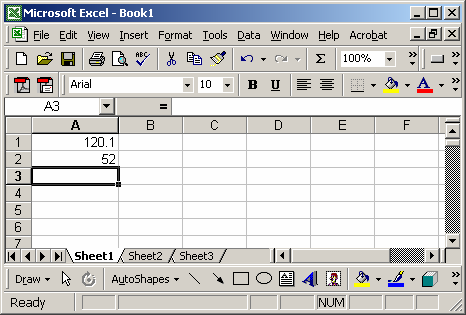
Based on the Excel spreadsheet above, the following DOLLAR examples would return:
=DOLLAR(A1, 0)
Result: "$120"

=DOLLAR(A1, 2)
Result: "$120.10"

=DOLLAR(A2, 1)
Result: "$52.1"

=DOLLAR(1345, 2)
Result: "$1,345.00"

=DOLLAR(A1+A2, 2)
Result: "$172.10"
Frequently Asked Questions
Question: In Microsoft Excel, my question concerns formatting numbers in a particular cell. For example, the cell says:
="Gas price: $" & CHOOSE(gas.deck, B1, B2, B3) & "per mmbtu"
But returns $3 when the cell is formatted to two decimals. If the price were $3.25, the correct price would show. Any help would be greatly appreciated.
Answer: Even though your cell is formatted with a number format, your formula is returning text not a numeric value so the number format will not be applied. You will need to apply the format to the number inside of the formula.
You could try using the DOLLAR function to apply the format as follows: (you will need to remove your $ sign because the DOLLAR function will insert one automatically)
="Gas price: " & DOLLAR(CHOOSE(gas.deck, B1, B2, B3)) & "per mmbtu"
This formula should now return something like:
Gas price: $3.25per mmbtu
Advertisements