



MS Excel: How to use the HYPERLINK Function (WS)
This Excel tutorial explains how to use the Excel HYPERLINK function with syntax and examples.
Description
The Microsoft Excel HYPERLINK function creates a shortcut to a file or Internet address.
The HYPERLINK function is a built-in function in Excel that is categorized as a Lookup/Reference Function. It can be used as a worksheet function (WS) in Excel. As a worksheet function, the HYPERLINK function can be entered as part of a formula in a cell of a worksheet.
Syntax
The syntax for the HYPERLINK function in Microsoft Excel is:
HYPERLINK ( link, [display_name] )
Parameters or Arguments
- link
- A path to the file or the URL to the Internet address.
- display_name
- Optional. It is the value that appears in the cell. If this parameter is omitted, then the link will appear in the cell.
Returns
The HYPERLINK function creates a hyperlink to a file or Internet address.
Applies To
- Excel for Office 365, Excel 2019, Excel 2016, Excel 2013, Excel 2011 for Mac, Excel 2010, Excel 2007, Excel 2003, Excel XP, Excel 2000
Type of Function
- Worksheet function (WS)
Example (as Worksheet Function)
Let's look at some Excel HYPERLINK examples and explore how to use the HYPERLINK function as a worksheet function in Microsoft Excel: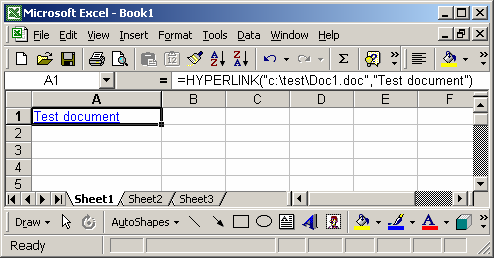
In our first example, we're using the HYPERLINK function to reference a file called "Doc1.doc" that can be found in the c:\test\ directory. The following formula has been entered in cell A1:
=HYPERLINK("c:\test\Doc1.doc","Test document")
When a user clicks on cell A1, the Word document called "Doc1.doc" will automatically open.
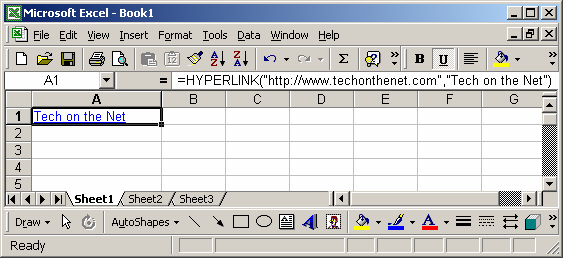
In our second example, we're using the HYPERLINK function to reference an Internet address. The following formula has been entered in cell A1:
=HYPERLINK("http://www.techonthenet.com","Tech on the Net")
When a user clicks on cell A1, the default web browser will open to the site called www.techonthenet.com.
Advertisements