



MS Excel: How to use the MID Function (WS, VBA)
This Excel tutorial explains how to use the Excel MID function with syntax and examples.
Description
The Microsoft Excel MID function extracts a substring from a string (starting at any position).
The MID function is a built-in function in Excel that is categorized as a String/Text Function. It can be used as a worksheet function (WS) and a VBA function (VBA) in Excel. As a worksheet function, the MID function can be entered as part of a formula in a cell of a worksheet. As a VBA function, you can use this function in macro code that is entered through the Microsoft Visual Basic Editor.
 Subscribe
If you want to follow along with this tutorial, download the example spreadsheet.
Syntax
The syntax for the MID function in Microsoft Excel is:
MID( text, start_position, number_of_characters )
Parameters or Arguments
- text
- The string that you wish to extract from.
- start_position
- The position in the string that you will begin extracting from. The first position in the string is 1.
- number_of_characters
- The number of characters that you wish to extract. It is mandatory when the MID function is used as a Worksheet function, but optional in VBA. (If you omit this parameter in VBA, the MID function will return all characters after the start_position. )
Returns
The MID function returns a string/text value.
Applies To
- Excel for Office 365, Excel 2019, Excel 2016, Excel 2013, Excel 2011 for Mac, Excel 2010, Excel 2007, Excel 2003, Excel XP, Excel 2000
Type of Function
- Worksheet function (WS)
- VBA function (VBA)
Example (as Worksheet Function)
Let's look at some Excel MID function examples and explore how to use the MID function as a worksheet function in Microsoft Excel:
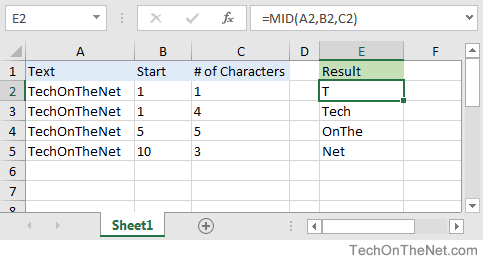
Based on the Excel spreadsheet above, the following MID examples would return:
=MID(A2, B2, C2)
Result: "T"

=MID(A3, 1, 4)
Result: "Tech"

=MID("TechOnTheNet", 5, 5)
Result: "OnThe"

=MID("TechOnTheNet", 10, 3)
Result: "Net"
More Worksheet Examples
Here are more examples that show how to use the MID function as a worksheet function in Excel:
Example (as VBA Function)
The MID function can also be used in VBA code in Microsoft Excel.
Let's look at some Excel MID function examples and explore how to use the MID function in Excel VBA code:
Dim LResult As String

LResult = Mid("Alphabet", 5, 2)
The variable LResult would now contain the value of "ab".
Advertisements