



MS Excel: How to use the ROUNDDOWN Function (WS)
This Excel tutorial explains how to use the Excel ROUNDDOWN function with syntax and examples.
Description
The Microsoft Excel ROUNDDOWN function returns a number rounded down to a specified number of digits. (Always rounds towards 0.)
The ROUNDDOWN function is a built-in function in Excel that is categorized as a Math/Trig Function. It can be used as a worksheet function (WS) in Excel. As a worksheet function, the ROUNDDOWN function can be entered as part of a formula in a cell of a worksheet.
Syntax
The syntax for the ROUNDDOWN function in Microsoft Excel is:
ROUNDDOWN( number, digits )
Parameters or Arguments
- number
- The number to round down.
- digits
- The number of digits to round the number down to.
Returns
The ROUNDDOWN function returns a numeric value.
Applies To
- Excel for Office 365, Excel 2019, Excel 2016, Excel 2013, Excel 2011 for Mac, Excel 2010, Excel 2007, Excel 2003, Excel XP, Excel 2000
Type of Function
- Worksheet function (WS)
Example (as Worksheet Function)
Let's look at some Excel ROUNDDOWN function examples and explore how to use the ROUNDDOWN function as a worksheet function in Microsoft Excel:
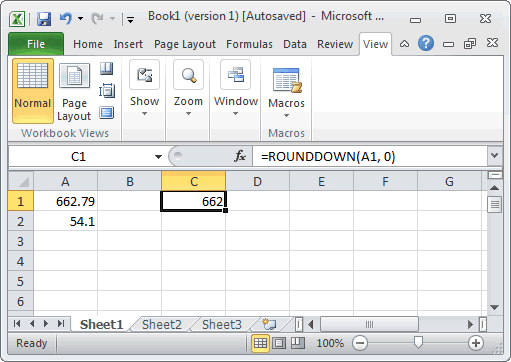
Based on the Excel spreadsheet above, the following ROUNDDOWN examples would return:
=ROUNDDOWN(A1, 0)
Result: 662

=ROUNDDOWN(A1, 1)
Result: 662.7

=ROUNDDOWN(A2, -1)
Result: 50

=ROUNDDOWN(55.1, -1)
Result: 50

=ROUNDDOWN(-23.67, 1)
Result: -23.6
Advertisements