



MS Excel: How to use the WEEKDAY Function (WS, VBA)
This Excel tutorial explains how to use the Excel WEEKDAY function with syntax and examples.
Description
The Microsoft Excel WEEKDAY function returns a number representing the day of the week, given a date value.
The WEEKDAY function is a built-in function in Excel that is categorized as a Date/Time Function. It can be used as a worksheet function (WS) and a VBA function (VBA) in Excel. As a worksheet function, the WEEKDAY function can be entered as part of a formula in a cell of a worksheet. As a VBA function, you can use this function in macro code that is entered through the Microsoft Visual Basic Editor.
Syntax
The syntax for the WEEKDAY function in Microsoft Excel is:
WEEKDAY( serial_number, [return_value] )
Parameters or Arguments
- serial_number
- A date expressed as a serial number or a date in quotation marks.
- return_value
Optional. It determines the day to use as the first day of the week in the calculations.
Warning: The return_value parameter accepts different values depending on whether you are using the WEEKDAY function as a worksheet function or a VBA function.Worksheet Function
The return_value parameter, when used as a worksheet function, can be any of the following values:
Value Explanation Version 1 Returns a number from 1 (Sunday) to 7 (Saturday).
This is the default if parameter is omitted.2 Returns a number from 1 (Monday) to 7 (Sunday). 3 Returns a number from 0 (Monday) to 6 (Sunday). 11 Returns a number from 1 (Monday) to 7 (Sunday). * Introduced in Excel 2010 12 Returns a number from 1 (Tuesday) to 7 (Monday). * Introduced in Excel 2010 13 Returns a number from 1 (Wednesday) to 7 (Tuesday). * Introduced in Excel 2010 14 Returns a number from 1 (Thursday) to 7 (Wednesday). * Introduced in Excel 2010 15 Returns a number from 1 (Friday) to 7 (Thursday). * Introduced in Excel 2010 16 Returns a number from 1 (Saturday) to 7 (Friday). * Introduced in Excel 2010 17 Returns a number from 1 (Sunday) to 7 (Saturday). * Introduced in Excel 2010 Note: Starting in Excel 2010, Microsoft has introduced new values for the return_value parameter when used as a worksheet function. You can now use 11 through 17 as valid parameters. This allows you to change the first day of the week to any day (Monday through Sunday).VBA Function
The return_value parameter, when used as a VBA function, can be any of the following values:
Value Explanation vbUseSystemDayOfWeek Returns a number from 1 to 7 and uses your system settings to determine the first day of the week vbMonday Returns a number from 1 (Monday) to 7 (Sunday). vbTuesday Returns a number from 1 (Tuesday) to 7 (Monday). vbWednesday Returns a number from 1 (Wednesday) to 7 (Tuesday). vbThursday Returns a number from 1 (Thursday) to 7 (Wednesday). vbFriday Returns a number from 1 (Friday) to 7 (Thursday). vbSaturday Returns a number from 1 (Saturday) to 7 (Friday). vbSunday Returns a number from 1 (Sunday) to 7 (Saturday).
Returns
The WEEKDAY function returns a numeric value.
Applies To
- Excel for Office 365, Excel 2019, Excel 2016, Excel 2013, Excel 2011 for Mac, Excel 2010, Excel 2007, Excel 2003, Excel XP, Excel 2000
Type of Function
- Worksheet function (WS)
- VBA function (VBA)
Example (as Worksheet Function)
Let's look at some Excel WEEKDAY function examples and explore how to use the WEEKDAY function as a worksheet function in Microsoft Excel:
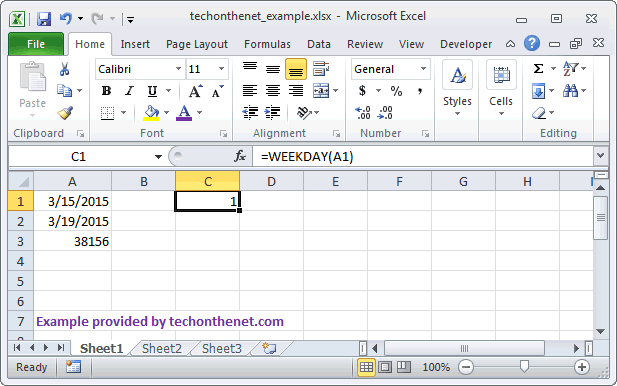
Based on the Excel spreadsheet above, the following WEEKDAY examples would return:
=WEEKDAY(A1)
Result: 1

=WEEKDAY(A1, 1)
Result: 1

=WEEKDAY(A1, 2)
Result: 7

=WEEKDAY(A2)
Result: 5

=WEEKDAY(A3)
Result: 6

=WEEKDAY(38157)
Result: 7

=WEEKDAY("Apr 21, 2015")
Result: 3

** Starting in Excel 2010, you can use 11 through 17 as the second parameter and change the first day of the week (in the calculations)

=WEEKDAY(DATE(2015,3,15),11)
Result: 7        (first day of the week is Monday)

=WEEKDAY(DATE(2015,3,15),12)
Result: 6        (first day of the week is Tuesday)

=WEEKDAY(DATE(2015,3,15),13)
Result: 5        (first day of the week is Wednesday)

=WEEKDAY(DATE(2015,3,15),14)
Result: 4        (first day of the week is Thursday)

=WEEKDAY(DATE(2015,3,15),15)
Result: 3        (first day of the week is Friday)

=WEEKDAY(DATE(2015,3,15),16)
Result: 2        (first day of the week is Saturday)

=WEEKDAY(DATE(2015,3,15),17)
Result: 1        (first day of the week is Sunday)
Example (as VBA Function)
The WEEKDAY function can also be used in VBA code in Microsoft Excel.
Let's look at some Excel WEEKDAY function examples and explore how to use the WEEKDAY function in Excel VBA code:
Dim LWeekday As Integer

LWeekday = Weekday("12/31/2001", vbSunday)
In this example, the variable called LWeekday would now contain the value of 2.
Frequently Asked Questions
Question: Is there a LIKE function in Excel similar to the one in Access? I'm trying to write a formula equivalent to the following:
=if(D14 like "*Saturday*", Now()+2, Now()+1)
Where cell D14 is a date value formatted as Saturday, August 27, 2005.
Answer: Since your value in cell D14 is a date value, you can use the WEEKDAY function to determine which day of the week it is. In this case, you are looking for a Saturday. The WEEKDAY function will return a value of 7 when the date falls on a Saturday.
Try using the following formula:
=if(Weekday(D14)=7,Now()+2,Now()+1)
Advertisements