



MS Excel: How to test a string for an alphanumeric value
This Excel tutorial explains how to test for an alphanumeric value (with screenshots and step-by-step instructions).
Question: In Microsoft Excel, I want to know if a string value contains alphanumeric characters only. How can I do this?
Answer: To accomplish this, you need to create a custom function.
You'll need to open your Excel spreadsheet. Press Alt+F11 and create a new module.
Then paste into the new module the following function:
Function AlphaNumeric(pValue) As Boolean

   Dim LPos As Integer
   Dim LChar As String
   Dim LValid_Values As String

   'Start at first character in pValue
   LPos = 1

   'Set up values that are considered to be alphanumeric
   LValid_Values = " abcdefghijklmnopqrstuvwxyzABCDEFGHIJKLMNOPQRSTUVWXYZ+-.0123456789"

   'Test each character in pValue
   While LPos <= Len(pValue)

      'Single character in pValue
      LChar = Mid(pValue, LPos, 1)

      'If character is not alphanumeric, return FALSE
      If InStr(LValid_Values, LChar) = 0 Then
         AlphaNumeric = False
         Exit Function
      End If

      'Increment counter
      LPos = LPos + 1

   Wend

   'Value is alphanumeric, return TRUE
   AlphaNumeric = True

End Function
The AlphaNumeric function will return TRUE if all of the values in the string are alphanumeric. Otherwise, it will return FALSE.
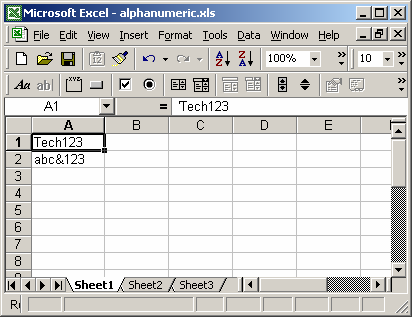
Based on the Excel spreadsheet above, the following AlphaNumeric examples would return:
=AlphaNumeric(A1)
Result: TRUE

=AlphaNumeric(A2)
Result: FALSE

=AlphaNumeric("6.49")
Result: TRUE

=AlphaNumeric("^Tech on the Net ")
Result: FALSE
Advertisements